19: Queue-Based Processing with Laravel
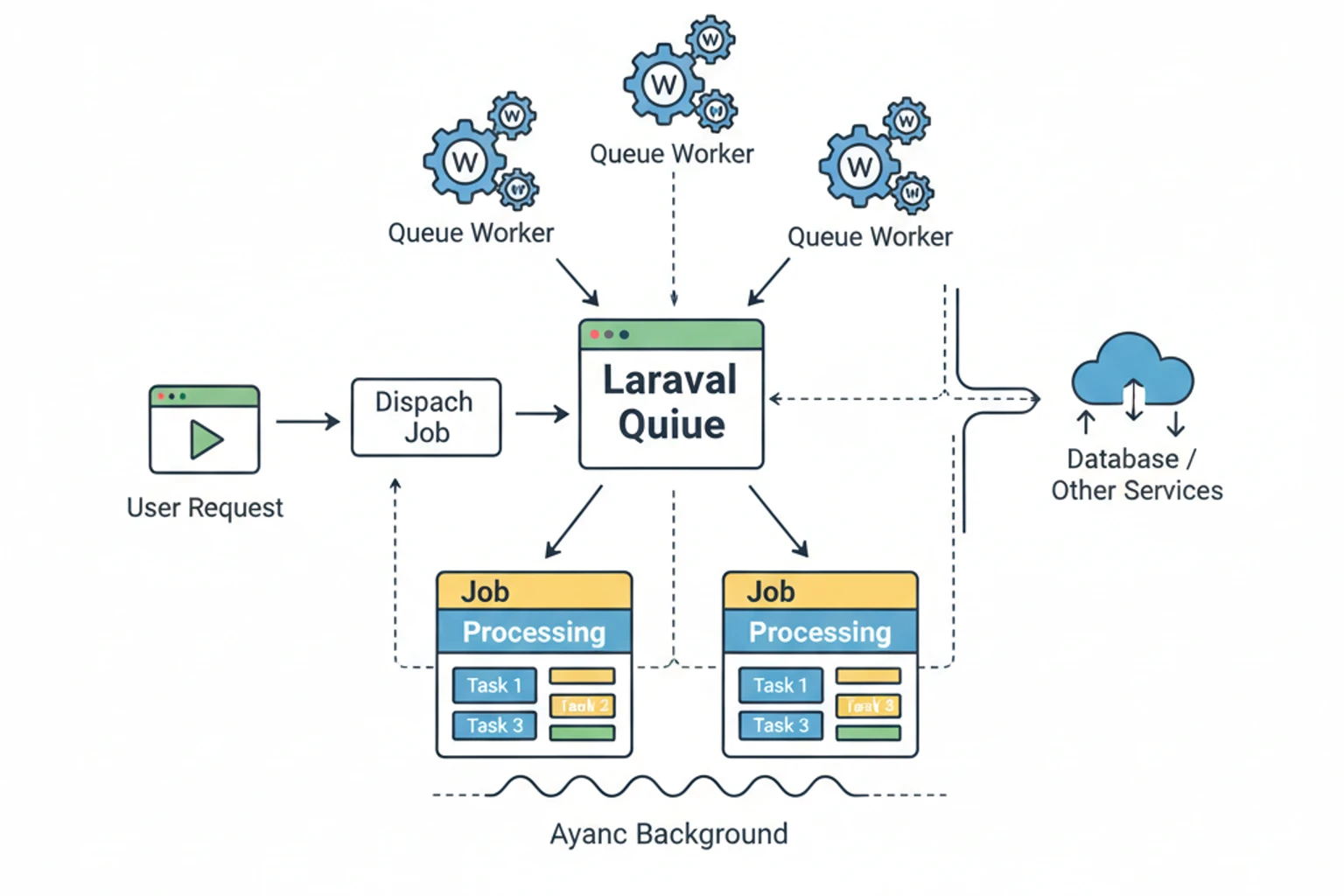
Chapter 19: Queue-Based Processing with Laravel
Section titled “Chapter 19: Queue-Based Processing with Laravel”Overview
Section titled “Overview”Long-running Claude API requests can block your application and frustrate users. Laravel’s queue system provides the perfect solution for asynchronous AI processing—enabling background jobs, batch operations, progress tracking, and retry logic for failed requests.
This chapter teaches you to build production-ready queue-based Claude integrations with Laravel, handling everything from simple background jobs to complex batch processing with real-time progress updates.
::: info When to Use Queues vs Other Approaches
- Laravel Queues (this chapter): Individual or small batches (< 100 requests), real-time progress tracking, interactive user experience
- Real-time WebSockets (Chapter 20): Streaming responses directly to users, interactive chat, live typing indicators
- Anthropic Batch API (Chapter 39): Large batches (100+ requests), 50% cost savings acceptable, results can wait 24 hours
- Caching (Chapter 18): Reduce API calls for repeated prompts, avoid redundant processing
This chapter focuses on Laravel queues for production-grade background processing with progress tracking and real-time updates. :::
Prerequisites
Section titled “Prerequisites”Before diving in, ensure you have:
- ✓ Laravel 11+ installed and configured
- ✓ Laravel queues basic understanding
- ✓ Redis or database queue driver configured
- ✓ Chapter 17 completed (Service class knowledge)
Estimated Time: 60-90 minutes
What You’ll Build
Section titled “What You’ll Build”By the end of this chapter, you will have created:
- A complete queue-based Claude request processing system
- A
ProcessClaudeRequestjob with retry logic and error handling - Database models and migrations for tracking request status
- RESTful API controllers for submitting and checking request status
- Batch processing capabilities for multiple prompts
- Real-time progress updates using Laravel Broadcasting
- Priority queue configuration for different request types
- Rate limiting and webhook notification systems
You’ll understand how to handle long-running AI operations asynchronously, track their progress, and provide a responsive user experience even when API calls take minutes to complete.
Objectives
Section titled “Objectives”By completing this chapter, you will:
- Understand how Laravel queues solve the problem of blocking API requests
- Create queue jobs that integrate with Claude API calls
- Implement database tracking for asynchronous request status
- Build batch processing systems for multiple concurrent requests
- Set up real-time progress updates using WebSockets
- Configure priority queues and worker management
- Implement rate limiting and retry strategies
- Handle job failures and webhook notifications
Queue Architecture for Claude
Section titled “Queue Architecture for Claude”The queue-based architecture for Claude follows a clear flow:
- HTTP Request → User submits a request via API
- Create Request Record → Save initial request details to database with “pending” status
- Dispatch Job to Queue → Push job to Redis/database queue for background processing
- Queue Worker Picks Up Job → Background worker retrieves and executes job
- Execute Claude API Call → Worker calls Claude API with request parameters
- Success Path:
- Store API response in database
- Update status to “completed”
- Trigger notifications (WebSocket/webhook)
- Failure Path:
- Retry logic (up to 3 times with exponential backoff)
- After retries exhausted, mark as “failed”
- Notify user of failure
This architecture ensures non-blocking operations, automatic retries, and comprehensive status tracking throughout the request lifecycle.
Step 1: Create the Queue Job (~15 min)
Section titled “Step 1: Create the Queue Job (~15 min)”Create a Laravel queue job that processes Claude API requests asynchronously with proper error handling and retry logic.
Actions
Section titled “Actions”- Create the job class that implements
ShouldQueueinterface - Configure retry and timeout settings for reliable processing
- Implement the handle method to call Claude API and update request status
- Add failure handling for permanent job failures
Code Implementation
Section titled “Code Implementation”<?phpdeclare(strict_types=1);
namespace App\Jobs;
use App\Contracts\ClaudeServiceInterface;use App\Models\ClaudeRequest;use Illuminate\Bus\Queueable;use Illuminate\Contracts\Queue\ShouldQueue;use Illuminate\Foundation\Bus\Dispatchable;use Illuminate\Queue\InteractsWithQueue;use Illuminate\Queue\SerializesModels;use Illuminate\Support\Facades\Log;
class ProcessClaudeRequest implements ShouldQueue{ use Dispatchable, InteractsWithQueue, Queueable, SerializesModels;
/** * The number of times the job may be attempted. */ public int $tries = 3;
/** * The number of seconds to wait before retrying. */ public int $backoff = 10;
/** * The maximum number of seconds the job can run. */ public int $timeout = 300;
public function __construct( public ClaudeRequest $request ) {}
public function handle(ClaudeServiceInterface $claude): void { Log::info('Processing Claude request', [ 'request_id' => $this->request->id, 'prompt' => substr($this->request->prompt, 0, 50) ]);
try { // Update status to processing $this->request->update([ 'status' => 'processing', 'started_at' => now(), ]);
// Make Claude API call using SDK $response = $claude->messages()->create([ 'model' => $this->request->model ?? 'claude-sonnet-4-5-20250929', 'max_tokens' => $this->request->max_tokens ?? 4096, 'temperature' => $this->request->temperature ?? 1.0, 'messages' => [ [ 'role' => 'user', 'content' => $this->request->prompt ] ] ]);
// Store result $this->request->update([ 'status' => 'completed', 'response' => $response->content[0]->text, 'metadata' => [ 'usage' => $response->usage, 'model' => $response->model, 'stop_reason' => $response->stopReason ], 'completed_at' => now(), ]);
Log::info('Claude request completed', [ 'request_id' => $this->request->id, 'tokens_used' => $response->usage->outputTokens ]);
} catch (\Exception $e) { Log::error('Claude request failed', [ 'request_id' => $this->request->id, 'error' => $e->getMessage(), 'attempt' => $this->attempts() ]);
$this->request->update([ 'status' => 'failed', 'error_message' => $e->getMessage(), 'failed_at' => now(), ]);
// Re-throw to trigger retry logic throw $e; } }
/** * Handle a job failure. */ public function failed(\Throwable $exception): void { Log::error('Claude request permanently failed', [ 'request_id' => $this->request->id, 'error' => $exception->getMessage() ]);
$this->request->update([ 'status' => 'failed', 'error_message' => $exception->getMessage(), 'failed_at' => now(), ]); }}Expected Result
Section titled “Expected Result”After creating this job, you can dispatch Claude requests to the queue:
ProcessClaudeRequest::dispatch($claudeRequest);The job will automatically:
- Be queued for background processing
- Retry up to 3 times on failure
- Wait 10 seconds between retries
- Timeout after 5 minutes
- Update the request status at each stage
Why It Works
Section titled “Why It Works”Laravel’s queue system serializes the job and stores it in your queue driver (Redis, database, etc.). When a worker picks up the job, it deserializes the ClaudeRequest model and calls the handle() method. The ShouldQueue interface tells Laravel this job should be processed asynchronously. The $tries, $backoff, and $timeout properties configure retry behavior and prevent jobs from running indefinitely.
Step 2: Set Up Database Tracking (~10 min)
Section titled “Step 2: Set Up Database Tracking (~10 min)”Create database tables and models to track the status of queued Claude requests throughout their lifecycle.
Actions
Section titled “Actions”- Create migration for
claude_requeststable - Define the model with relationships and helper methods
- Add indexes for efficient status queries
Code Implementation
Section titled “Code Implementation”Database Migration for Tracking:
<?phpdeclare(strict_types=1);
use Illuminate\Database\Migrations\Migration;use Illuminate\Database\Schema\Blueprint;use Illuminate\Support\Facades\Schema;
return new class extends Migration{    public function up(): void    {        Schema::create('claude_requests', function (Blueprint $table) {            $table->id();            $table->foreignId('user_id')->constrained()->cascadeOnDelete();            $table->string('status')->default('pending'); // pending, processing, completed, failed            $table->text('prompt');            $table->longText('response')->nullable();            $table->json('metadata')->nullable();            $table->string('model')->default('claude-sonnet-4-5-20250929');            $table->integer('max_tokens')->default(4096);            $table->decimal('temperature', 3, 2)->default(1.0);            $table->text('error_message')->nullable();            $table->timestamp('started_at')->nullable();            $table->timestamp('completed_at')->nullable();            $table->timestamp('failed_at')->nullable();            $table->timestamps();
            $table->index(['user_id', 'status']);            $table->index('status');        });    }
    public function down(): void    {        Schema::dropIfExists('claude_requests');    }};
Model Definition
Section titled “Model Definition”<?phpdeclare(strict_types=1);
namespace App\Models;
use Illuminate\Database\Eloquent\Model;use Illuminate\Database\Eloquent\Relations\BelongsTo;
class ClaudeRequest extends Model{ protected $fillable = [ 'user_id', 'status', 'prompt', 'response', 'metadata', 'model', 'max_tokens', 'temperature', 'error_message', 'started_at', 'completed_at', 'failed_at', ];
protected $casts = [ 'metadata' => 'array', 'max_tokens' => 'integer', 'temperature' => 'float', 'started_at' => 'datetime', 'completed_at' => 'datetime', 'failed_at' => 'datetime', ];
public function user(): BelongsTo { return $this->belongsTo(User::class); }
public function isCompleted(): bool { return $this->status === 'completed'; }
public function isFailed(): bool { return $this->status === 'failed'; }
public function isProcessing(): bool { return $this->status === 'processing'; }
public function getDuration(): ?int { if (!$this->started_at || !$this->completed_at) { return null; }
return $this->started_at->diffInSeconds($this->completed_at); }}Expected Result
Section titled “Expected Result”After running the migration, you’ll have a claude_requests table that tracks:
- Request status (pending, processing, completed, failed)
- User association
- Prompt and response data
- Model configuration (model, max_tokens, temperature)
- Timestamps for each stage (started_at, completed_at, failed_at)
- Error messages for failed requests
Why It Works
Section titled “Why It Works”The migration creates a comprehensive tracking table with proper indexes on user_id and status for efficient querying. The model uses Laravel’s Eloquent ORM to provide type-safe access to request data. The helper methods (isCompleted(), isFailed(), getDuration()) encapsulate status logic, making your controllers cleaner. The metadata JSON cast automatically serializes/deserializes the Claude API response metadata.
Step 3: Build the API Controller (~15 min)
Section titled “Step 3: Build the API Controller (~15 min)”Create RESTful API endpoints that allow users to submit Claude requests and check their status.
Actions
Section titled “Actions”- Create controller with store, show, and index methods
- Add validation for request parameters
- Dispatch jobs to the queue
- Return appropriate HTTP status codes
Code Implementation
Section titled “Code Implementation”Controller Implementation:
<?phpdeclare(strict_types=1);
namespace App\Http\Controllers;
use App\Jobs\ProcessClaudeRequest;use App\Models\ClaudeRequest;use Illuminate\Http\JsonResponse;use Illuminate\Http\Request;
class ClaudeRequestController extends Controller{    /**     * Submit a new Claude request (queued)     */    public function store(Request $request): JsonResponse    {        $validated = $request->validate([            'prompt' => 'required|string|max:50000',            'max_tokens' => 'nullable|integer|min:1|max:200000',            'temperature' => 'nullable|numeric|min:0|max:1',            'model' => 'nullable|string|in:claude-opus-4-1-20250805,claude-sonnet-4-5-20250929,claude-haiku-4-5-20251001',        ]);
        // Create request record        $claudeRequest = ClaudeRequest::create([            'user_id' => $request->user()->id,            'prompt' => $validated['prompt'],            'max_tokens' => $validated['max_tokens'] ?? 4096,            'temperature' => $validated['temperature'] ?? 1.0,            'model' => $validated['model'] ?? 'claude-sonnet-4-5-20250929',            'status' => 'pending',        ]);
        // Dispatch to queue        ProcessClaudeRequest::dispatch($claudeRequest);
        return response()->json([            'success' => true,            'request_id' => $claudeRequest->id,            'status' => $claudeRequest->status,            'message' => 'Request queued for processing',        ], 202);    }
    /**     * Get request status     */    public function show(ClaudeRequest $claudeRequest): JsonResponse    {        $this->authorize('view', $claudeRequest);
        return response()->json([            'id' => $claudeRequest->id,            'status' => $claudeRequest->status,            'prompt' => $claudeRequest->prompt,            'response' => $claudeRequest->response,            'metadata' => $claudeRequest->metadata,            'error_message' => $claudeRequest->error_message,            'created_at' => $claudeRequest->created_at,            'started_at' => $claudeRequest->started_at,            'completed_at' => $claudeRequest->completed_at,            'duration_seconds' => $claudeRequest->getDuration(),        ]);    }
    /**     * List user's requests     */    public function index(Request $request): JsonResponse    {        $requests = ClaudeRequest::where('user_id', $request->user()->id)            ->orderByDesc('created_at')            ->paginate(20);
        return response()->json($requests);    }}
Expected Result
Section titled “Expected Result”You can now submit requests via API:
# Submit a requestPOST /api/claude/requests{  "prompt": "Explain quantum computing",  "max_tokens": 1000,  "temperature": 0.7}
# Response (202 Accepted){  "success": true,  "request_id": 123,  "status": "pending",  "message": "Request queued for processing"}
# Check statusGET /api/claude/requests/123
Why It Works
Section titled “Why It Works”The controller creates a database record immediately and dispatches the job to the queue, returning a 202 (Accepted) status code. This tells the client the request was accepted but not yet processed. The client can then poll the status endpoint or use WebSockets (covered later) to get updates. The authorize() call ensures users can only view their own requests, providing security.
Step 4: Implement Batch Processing (~20 min)
Section titled “Step 4: Implement Batch Processing (~20 min)”Process multiple Claude prompts in parallel using Laravel’s batch job system with progress tracking.
Actions
Section titled “Actions”- Create batch job that processes individual items
- Build batch controller to create and track batches
- Set up batch callbacks for completion and failure handling
- Add progress tracking for real-time updates
Code Implementation
Section titled “Code Implementation”<?phpdeclare(strict_types=1);
namespace App\Jobs;
use App\Contracts\ClaudeServiceInterface;use App\Models\ClaudeBatch;use App\Models\ClaudeBatchItem;use Illuminate\Bus\Batchable;use Illuminate\Bus\Queueable;use Illuminate\Contracts\Queue\ShouldQueue;use Illuminate\Foundation\Bus\Dispatchable;use Illuminate\Queue\InteractsWithQueue;use Illuminate\Queue\SerializesModels;
class ProcessClaudeBatch implements ShouldQueue{ use Batchable, Dispatchable, InteractsWithQueue, Queueable, SerializesModels;
public int $tries = 3; public int $timeout = 300;
public function __construct( public ClaudeBatchItem $item ) {}
public function handle(ClaudeServiceInterface $claude): void { // Check if batch has been cancelled if ($this->batch()?->cancelled()) { return; }
try { $this->item->update(['status' => 'processing']);
$response = $claude->messages()->create([ 'model' => $this->item->batch->model, 'max_tokens' => $this->item->batch->max_tokens, 'temperature' => $this->item->batch->temperature, 'messages' => [ [ 'role' => 'user', 'content' => $this->item->prompt ] ] ]);
$this->item->update([ 'status' => 'completed', 'response' => $response->content[0]->text, 'metadata' => [ 'usage' => $response->usage, 'model' => $response->model, 'stop_reason' => $response->stopReason ], 'completed_at' => now(), ]);
} catch (\Exception $e) { $this->item->update([ 'status' => 'failed', 'error_message' => $e->getMessage(), 'failed_at' => now(), ]);
throw $e; } }}Batch Controller:
<?phpdeclare(strict_types=1);
namespace App\Http\Controllers;
use App\Jobs\ProcessClaudeBatch;use App\Models\ClaudeBatch;use App\Models\ClaudeBatchItem;use Illuminate\Http\JsonResponse;use Illuminate\Http\Request;use Illuminate\Support\Facades\Bus;
class ClaudeBatchController extends Controller{    /**     * Create and process a batch of Claude requests     */    public function store(Request $request): JsonResponse    {        $validated = $request->validate([            'prompts' => 'required|array|min:1|max:100',            'prompts.*' => 'required|string|max:50000',            'max_tokens' => 'nullable|integer|min:1|max:200000',            'temperature' => 'nullable|numeric|min:0|max:1',            'model' => 'nullable|string',        ]);
        // Create batch        $batch = ClaudeBatch::create([            'user_id' => $request->user()->id,            'total_items' => count($validated['prompts']),            'max_tokens' => $validated['max_tokens'] ?? 4096,            'temperature' => $validated['temperature'] ?? 1.0,            'model' => $validated['model'] ?? 'claude-sonnet-4-5-20250929',        ]);
        // Create batch items        $jobs = [];        foreach ($validated['prompts'] as $index => $prompt) {            $item = ClaudeBatchItem::create([                'batch_id' => $batch->id,                'prompt' => $prompt,                'position' => $index,                'status' => 'pending',            ]);
            $jobs[] = new ProcessClaudeBatch($item);        }
        // Dispatch batch        $laravelBatch = Bus::batch($jobs)            ->then(function () use ($batch) {                $batch->update(['status' => 'completed', 'completed_at' => now()]);            })            ->catch(function () use ($batch) {                $batch->update(['status' => 'failed', 'failed_at' => now()]);            })            ->finally(function () use ($batch) {                // Any cleanup            })            ->name("Claude Batch {$batch->id}")            ->onQueue('claude')            ->dispatch();
        $batch->update(['batch_id' => $laravelBatch->id]);
        return response()->json([            'success' => true,            'batch_id' => $batch->id,            'total_items' => $batch->total_items,            'status' => $batch->status,        ], 202);    }
    /**     * Get batch status and progress     */    public function show(ClaudeBatch $batch): JsonResponse    {        $this->authorize('view', $batch);
        $batch->load('items');
        $completed = $batch->items->where('status', 'completed')->count();        $failed = $batch->items->where('status', 'failed')->count();        $processing = $batch->items->where('status', 'processing')->count();        $pending = $batch->items->where('status', 'pending')->count();
        return response()->json([            'id' => $batch->id,            'status' => $batch->status,            'total_items' => $batch->total_items,            'progress' => [                'completed' => $completed,                'failed' => $failed,                'processing' => $processing,                'pending' => $pending,                'percentage' => ($completed + $failed) / $batch->total_items * 100,            ],            'items' => $batch->items->map(fn($item) => [                'id' => $item->id,                'position' => $item->position,                'status' => $item->status,                'prompt' => substr($item->prompt, 0, 100),                'response' => $item->response ? substr($item->response, 0, 100) : null,                'error_message' => $item->error_message,            ]),            'created_at' => $batch->created_at,            'completed_at' => $batch->completed_at,        ]);    }}
Expected Result
Section titled “Expected Result”You can process multiple prompts in a batch:
POST /api/claude/batches{  "prompts": [    "Explain quantum computing",    "Describe machine learning",    "What is PHP?"  ]}
# Response{  "success": true,  "batch_id": 456,  "total_items": 3,  "status": "pending"}
# Check progressGET /api/claude/batches/456{  "progress": {    "completed": 2,    "failed": 0,    "processing": 1,    "pending": 0,    "percentage": 66.67  }}
Why It Works
Section titled “Why It Works”Laravel’s batch system (Bus::batch()) groups multiple jobs together and tracks their collective progress. The Batchable trait allows jobs to check if their batch was cancelled. The then(), catch(), and finally() callbacks execute when all jobs complete, fail, or finish respectively. This provides a clean way to handle multiple related operations and update the batch status accordingly.
Step 5: Add Real-Time Progress Updates (~15 min)
Section titled “Step 5: Add Real-Time Progress Updates (~15 min)”Enable real-time progress updates using Laravel Broadcasting so users see results immediately without polling.
Actions
Section titled “Actions”- Create broadcast event for request completion
- Update job to fire the event
- Set up frontend listener for WebSocket updates
Code Implementation
Section titled “Code Implementation”<?phpdeclare(strict_types=1);
namespace App\Events;
use App\Models\ClaudeRequest;use Illuminate\Broadcasting\Channel;use Illuminate\Broadcasting\InteractsWithSockets;use Illuminate\Broadcasting\PrivateChannel;use Illuminate\Contracts\Broadcasting\ShouldBroadcast;use Illuminate\Foundation\Events\Dispatchable;use Illuminate\Queue\SerializesModels;
class ClaudeRequestCompleted implements ShouldBroadcast{ use Dispatchable, InteractsWithSockets, SerializesModels;
public function __construct( public ClaudeRequest $request ) {}
public function broadcastOn(): Channel { return new PrivateChannel('users.' . $this->request->user_id); }
public function broadcastAs(): string { return 'claude.request.completed'; }
public function broadcastWith(): array { return [ 'request_id' => $this->request->id, 'status' => $this->request->status, 'response' => $this->request->response, 'metadata' => $this->request->metadata, ]; }}Update the job to fire the event:
<?php# filename: app/Jobs/ProcessClaudeRequest.php (updated)
// In the handle method, after successful completion:$this->request->update([    'status' => 'completed',    'response' => $result['text'],    'metadata' => $result['metadata'],    'completed_at' => now(),]);
// Fire eventevent(new \App\Events\ClaudeRequestCompleted($this->request));
Frontend Integration
Section titled “Frontend Integration”import Echo from "laravel-echo";import Pusher from "pusher-js";
window.Pusher = Pusher;
window.Echo = new Echo({ broadcaster: "pusher", key: import.meta.env.VITE_PUSHER_APP_KEY, cluster: import.meta.env.VITE_PUSHER_APP_CLUSTER, forceTLS: true,});
// Listen for Claude request completionsEcho.private(`users.${userId}`).listen(".claude.request.completed", (event) => { console.log("Claude request completed:", event);
// Update UI updateRequestStatus(event.request_id, { status: event.status, response: event.response, metadata: event.metadata, });});
function updateRequestStatus(requestId, data) { const element = document.querySelector(`[data-request-id="${requestId}"]`); if (element) { element.querySelector(".status").textContent = data.status; element.querySelector(".response").textContent = data.response; element.classList.add("completed"); }}Expected Result
Section titled “Expected Result”When a request completes, the frontend automatically receives an update:
// User sees update immediately without refreshing{ request_id: 123, status: "completed", response: "Quantum computing uses...", metadata: { usage: {...} }}Why It Works
Section titled “Why It Works”Laravel Broadcasting uses Pusher (or other drivers) to push events to connected clients. The ShouldBroadcast interface tells Laravel to automatically broadcast this event. The broadcastOn() method specifies a private channel scoped to the user, ensuring users only receive their own updates. The broadcastAs() method customizes the event name, and broadcastWith() controls what data is sent. The frontend Echo library listens for these events and updates the UI in real-time.
Step 6: Configure Advanced Queue Settings (~10 min)
Section titled “Step 6: Configure Advanced Queue Settings (~10 min)”Set up priority queues and worker management for production environments with different service level agreements.
Actions
Section titled “Actions”- Configure queue connections in config file
- Set up priority queues for different request types
- Create supervisor configuration for worker management
Code Implementation
Section titled “Code Implementation”Priority Queues:
<?phpreturn [ 'connections' => [ 'redis' => [ 'driver' => 'redis', 'connection' => 'default', 'queue' => env('REDIS_QUEUE', 'default'), 'retry_after' => 300, 'block_for' => null, 'after_commit' => false, ], ],];<?php# Dispatch with priority
// High priority (fast model for urgent requests)ProcessClaudeRequest::dispatch($request) ->onQueue('claude-high');
// Normal priorityProcessClaudeRequest::dispatch($request) ->onQueue('claude-normal');
// Low priority (batch processing)ProcessClaudeRequest::dispatch($request) ->onQueue('claude-low');Worker Configuration
Section titled “Worker Configuration”# filename: supervisor-claude-workers.conf
[program:claude-high-priority]process_name=%(program_name)s_%(process_num)02dcommand=php /path/to/artisan queue:work redis --queue=claude-high --tries=3 --timeout=300autostart=trueautorestart=truenumprocs=3user=www-dataredirect_stderr=truestdout_logfile=/var/log/laravel/claude-high.log
[program:claude-normal]process_name=%(program_name)s_%(process_num)02dcommand=php /path/to/artisan queue:work redis --queue=claude-normal --tries=3 --timeout=300autostart=trueautorestart=truenumprocs=5user=www-dataredirect_stderr=truestdout_logfile=/var/log/laravel/claude-normal.log
[program:claude-low]process_name=%(program_name)s_%(process_num)02dcommand=php /path/to/artisan queue:work redis --queue=claude-low --tries=2 --timeout=600autostart=trueautorestart=truenumprocs=2user=www-dataredirect_stderr=truestdout_logfile=/var/log/laravel/claude-low.logExpected Result
Section titled “Expected Result”You can dispatch jobs to different priority queues:
// Urgent requests go to high-priority queueProcessClaudeRequest::dispatch($request)->onQueue('claude-high');
// Normal requestsProcessClaudeRequest::dispatch($request)->onQueue('claude-normal');
// Batch processing goes to low-priority queueProcessClaudeRequest::dispatch($request)->onQueue('claude-low');
Supervisor manages workers automatically, restarting them if they crash.
Why It Works
Section titled “Why It Works”Priority queues allow you to process urgent requests before batch jobs. Redis queues support multiple named queues, and workers can be configured to process specific queues. Supervisor ensures workers stay running and automatically restarts them if they crash or consume too much memory. The numprocs setting runs multiple worker processes for parallel processing, increasing throughput.
Step 7: Implement Rate Limiting (~5 min)
Section titled “Step 7: Implement Rate Limiting (~5 min)”Prevent API quota exhaustion by rate limiting Claude API calls within queue jobs.
Actions
Section titled “Actions”- Add rate limiter to job handle method
- Configure limits based on your API tier
- Handle rate limit exceptions gracefully
Code Implementation
Section titled “Code Implementation”<?php# filename: app/Jobs/ProcessClaudeRequest.php (with rate limiting)
use Illuminate\Support\Facades\RateLimiter;
public function handle(ClaudeServiceInterface $claude): void{ // Rate limit: 50 requests per minute RateLimiter::attempt( 'claude-api', 50, function () use ($claude) { // Original processing logic here $this->processRequest($claude); }, 60 );}
private function processRequest(ClaudeServiceInterface $claude): void{ // ... processing logic}Expected Result
Section titled “Expected Result”Jobs will automatically throttle themselves:
// If 50 requests already processed this minute,// this job will wait until next minuteRateLimiter::attempt('claude-api', 50, function() { // Process request}, 60); // 60 second windowWhy It Works
Section titled “Why It Works”Laravel’s RateLimiter uses your cache driver (typically Redis) to track request counts per time window. The attempt() method checks if the limit is exceeded and either executes the callback immediately or throws a TooManyRequestsException. This prevents overwhelming the Claude API and helps you stay within rate limits. The rate limiter is atomic, so it works correctly even with concurrent workers.
Step 8: Add Webhook Notifications (~10 min)
Section titled “Step 8: Add Webhook Notifications (~10 min)”Enable external systems to receive notifications when Claude requests complete via webhooks.
Actions
Section titled “Actions”- Create webhook job that sends HTTP POST requests
- Dispatch webhook job after request completion
- Add retry logic for failed webhook deliveries
Code Implementation
Section titled “Code Implementation”<?phpdeclare(strict_types=1);
namespace App\Jobs;
use App\Models\ClaudeRequest;use Illuminate\Bus\Queueable;use Illuminate\Contracts\Queue\ShouldQueue;use Illuminate\Foundation\Bus\Dispatchable;use Illuminate\Queue\InteractsWithQueue;use Illuminate\Queue\SerializesModels;use Illuminate\Support\Facades\Http;
class SendClaudeWebhook implements ShouldQueue{ use Dispatchable, InteractsWithQueue, Queueable, SerializesModels;
public function __construct( public ClaudeRequest $request, public string $webhookUrl ) {}
public function handle(): void { $payload = [ 'event' => 'claude.request.completed', 'request_id' => $this->request->id, 'status' => $this->request->status, 'response' => $this->request->response, 'metadata' => $this->request->metadata, 'timestamp' => now()->toIso8601String(), ];
Http::timeout(10) ->retry(3, 100) ->post($this->webhookUrl, $payload); }}Expected Result
Section titled “Expected Result”After a request completes, a webhook is sent:
// In ProcessClaudeRequest job, after completion:SendClaudeWebhook::dispatch($this->request, $webhookUrl);The webhook payload includes:
{ "event": "claude.request.completed", "request_id": 123, "status": "completed", "response": "...", "metadata": {...}, "timestamp": "2025-01-15T10:30:00Z"}Why It Works
Section titled “Why It Works”Webhooks allow external systems to be notified asynchronously without polling. The SendClaudeWebhook job runs in a separate queue, so webhook failures don’t affect the main request processing. The Http::retry() method automatically retries failed webhook deliveries up to 3 times with 100ms delays, ensuring reliable delivery even if the webhook endpoint is temporarily unavailable.
Step 9: Testing Queue Jobs (~10 min)
Section titled “Step 9: Testing Queue Jobs (~10 min)”Learn to test queue jobs without external dependencies, ensuring your Claude integration logic works reliably.
Actions
Section titled “Actions”- Create a test class using PHPUnit
- Mock the Claude service to avoid API calls
- Test job dispatch and verify database updates
- Test failure scenarios and retry logic
Code Implementation
Section titled “Code Implementation”<?phpdeclare(strict_types=1);
namespace Tests\Feature;
use App\Jobs\ProcessClaudeRequest;use App\Models\ClaudeRequest;use App\Models\User;use Illuminate\Support\Facades\Queue;use Tests\TestCase;
class ProcessClaudeRequestJobTest extends TestCase{ protected User $user;
protected function setUp(): void { parent::setUp(); $this->user = User::factory()->create(); }
public function test_job_processes_successfully() { // Create a request to process $request = ClaudeRequest::create([ 'user_id' => $this->user->id, 'prompt' => 'Test prompt', 'status' => 'pending', 'model' => 'claude-sonnet-4-5-20250929', 'max_tokens' => 1024, 'temperature' => 1.0, ]);
// Mock the Claude service $this->mock(ClaudeServiceInterface::class, function ($mock) { $mock->shouldReceive('messages') ->once() ->andReturnSelf();
$mock->shouldReceive('create') ->once() ->andReturn((object) [ 'content' => [(object) ['text' => 'Test response']], 'usage' => (object) ['inputTokens' => 10, 'outputTokens' => 42], 'model' => 'claude-sonnet-4-5-20250929', 'stopReason' => 'end_turn' ]); });
// Execute the job $job = new ProcessClaudeRequest($request); $job->handle(app(ClaudeServiceInterface::class));
// Verify database was updated $this->assertDatabaseHas('claude_requests', [ 'id' => $request->id, 'status' => 'completed', 'response' => 'Test response', ]); }
public function test_job_handles_failure() { $request = ClaudeRequest::create([ 'user_id' => $this->user->id, 'prompt' => 'Test prompt', 'status' => 'pending', ]);
// Mock Claude service to throw exception $this->mock(ClaudeServiceInterface::class, function ($mock) { $mock->shouldReceive('messages') ->once() ->andReturnSelf();
$mock->shouldReceive('create') ->once() ->andThrow(new \Exception('API Error')); });
$job = new ProcessClaudeRequest($request);
// Verify exception is thrown for retry $this->expectException(Exception::class); $job->handle(app(ClaudeServiceInterface::class));
// Verify status was marked as failed $this->assertDatabaseHas('claude_requests', [ 'id' => $request->id, 'status' => 'failed', ]); }
public function test_job_dispatch_works_synchronously_in_testing() { Queue::fake();
$request = ClaudeRequest::create([ 'user_id' => $this->user->id, 'prompt' => 'Test prompt', 'status' => 'pending', ]);
ProcessClaudeRequest::dispatch($request);
// Verify job was dispatched Queue::assertPushed(ProcessClaudeRequest::class); }}Expected Result
Section titled “Expected Result”Tests pass and verify:
- Jobs execute successfully and update database
- Failures are handled gracefully
- Job dispatch works correctly
- Retries are attempted on failure
Why It Works
Section titled “Why It Works”Testing queue jobs requires mocking the Claude service to avoid API calls during tests. Laravel’s Queue::fake() allows you to verify jobs were dispatched without actually running them. By mocking the ClaudeServiceInterface, you test your job logic in isolation. Testing both success and failure paths ensures your retry logic works correctly.
Step 10: Integrate with Caching and Batch API (~10 min)
Section titled “Step 10: Integrate with Caching and Batch API (~10 min)”Combine queue processing with caching strategies and understand when to use Anthropic’s native Batch API.
Actions
Section titled “Actions”- Add caching checks before processing queued requests
- Compare Laravel job batching vs Anthropic Batch API
- Implement cost-effective patterns
Code Implementation
Section titled “Code Implementation”Combining Queues with Caching:
<?php# filename: app/Jobs/ProcessClaudeRequest.php (with caching)
public function handle(ClaudeServiceInterface $claude): void{    Log::info('Processing Claude request', [        'request_id' => $this->request->id,        'prompt' => substr($this->request->prompt, 0, 50)    ]);
    try {        $this->request->update([            'status' => 'processing',            'started_at' => now(),        ]);
        // Check cache first before calling Claude        $cacheKey = 'claude:' . hash('sha256', $this->request->prompt);        $cachedResponse = cache()->remember(            $cacheKey,            now()->addHours(24),            function () use ($claude) {                $response = $claude->messages()->create([                    'model' => $this->request->model ?? 'claude-sonnet-4-5-20250929',                    'max_tokens' => $this->request->max_tokens ?? 4096,                    'temperature' => $this->request->temperature ?? 1.0,                    'messages' => [                        [                            'role' => 'user',                            'content' => $this->request->prompt                        ]                    ]                ]);
                // Convert SDK response to our expected format                return [                    'text' => $response->content[0]->text,                    'metadata' => [                        'usage' => $response->usage,                        'model' => $response->model,                        'stop_reason' => $response->stopReason                    ]                ];            }        );
        // Store result from cache or fresh call        $this->request->update([            'status' => 'completed',            'response' => $cachedResponse['text'],            'metadata' => array_merge(                $cachedResponse['metadata'],                ['cached' => cache()->has($cacheKey)]            ),            'completed_at' => now(),        ]);
        Log::info('Claude request completed', [            'request_id' => $this->request->id,            'cached' => cache()->has($cacheKey),        ]);
    } catch (\Exception $e) {        Log::error('Claude request failed', [            'request_id' => $this->request->id,            'error' => $e->getMessage(),        ]);
        $this->request->update([            'status' => 'failed',            'error_message' => $e->getMessage(),            'failed_at' => now(),        ]);
        throw $e;    }}
Understanding When to Use What:
<?php/** * Decide between Laravel job batching vs Anthropic Batch API */class BatchProcessingStrategy{    /**     * Use Laravel Job Batching When:     * 1. You need real-time progress tracking     * 2. Results must be available within minutes     * 3. User is waiting for status updates     * 4. Different prompts have different requirements     *     * Example: User submitted 10 documents to analyze,     * wants to see results as they complete     */    public static function useJobBatching($items): bool    {        return count($items) <= 100 && needsRealTimeTracking();    }
    /**     * Use Anthropic Batch API When:     * 1. You have 100+ requests to process     * 2. Cost savings (50% discount) matter more than speed     * 3. Results can wait 24 hours     * 4. All requests have identical parameters     * 5. Bulk operations: daily reports, overnight backups     *     * Example: Process 10,000 customer support tickets     * overnight, save 50% on API costs     *     * Cost savings: Batch API = $0.0015/million tokens vs     * Standard = $0.003/million tokens (for Haiku)     */    public static function useBatchAPI($items): bool    {        return count($items) >= 100 && !needsRealTimeTracking();    }
    /**     * Hybrid Approach:     * - Small requests (< 50): Laravel queues for immediate results     * - Medium batch (50-100): Laravel job batching     * - Large batch (100+): Anthropic Batch API overnight     */    public static function hybrideApproach($items)    {        if (count($items) < 50) {            return 'laravel_queues'; // Immediate processing        } elseif (count($items) < 100) {            return 'job_batching'; // Progress tracking        } else {            return 'batch_api'; // Cost savings        }    }}
Expected Result
Section titled “Expected Result”Integrated queue processing with:
- Cache hits before API calls
- Metadata tracking for cached responses
- Clear decision tree for batch processing strategies
- Cost-aware job dispatching
Why It Works
Section titled “Why It Works”Caching checks in queue jobs reduce API calls significantly. By checking Redis/cache before calling Claude, you save money and improve speed. Understanding when to use Laravel’s job batching vs Anthropic’s Batch API helps you make cost-effective architectural decisions. Job batching excels at real-time tracking while Batch API excels at cost savings.
Step 11: Job Chaining for Complex Workflows (~10 min)
Section titled “Step 11: Job Chaining for Complex Workflows (~10 min)”Chain multiple queue jobs together for multi-step workflows without manual orchestration.
Actions
Section titled “Actions”- Create multiple jobs in a sequence
- Use Laravel’s WithChain to link them
- Pass data between jobs
- Handle failures in chains
Code Implementation
Section titled “Code Implementation”<?phpnamespace App\Jobs;
use App\Models\Document;use Illuminate\Bus\Queueable;use Illuminate\Contracts\Queue\ShouldQueue;use Illuminate\Foundation\Bus\Dispatchable;use Illuminate\Queue\InteractsWithQueue;use Illuminate\Queue\SerializesModels;
class AnalyzeDocumentChain implements ShouldQueue{ use Dispatchable, InteractsWithQueue, Queueable, SerializesModels;
public function __construct( public Document $document ) {}
public function handle(): void { // Step 1: Extract text from document $text = $this->document->extractText();
$this->document->update(['extracted_text' => $text]);
// Step 2: Chain to analysis job AnalyzeTextJob::dispatch($this->document) ->chain([ // Step 3: Generate summary new GenerateSummaryJob($this->document), // Step 4: Send notification new SendNotificationJob($this->document), ]); }}
class AnalyzeTextJob implements ShouldQueue{ use Dispatchable, InteractsWithQueue, Queueable, SerializesModels;
public function __construct(public Document $document) {}
public function handle(ClaudeServiceInterface $claude): void { $response = $claude->messages()->create([ 'model' => 'claude-sonnet-4-5-20250929', 'max_tokens' => 2048, 'messages' => [ [ 'role' => 'user', 'content' => "Analyze: " . $this->document->extracted_text ] ] ]);
$this->document->update(['analysis' => $response->content[0]->text]); }}
class GenerateSummaryJob implements ShouldQueue{ use Dispatchable, InteractsWithQueue, Queueable, SerializesModels;
public function __construct(public Document $document) {}
public function handle(ClaudeServiceInterface $claude): void { $response = $claude->messages()->create([ 'model' => 'claude-sonnet-4-5-20250929', 'max_tokens' => 1024, 'messages' => [ [ 'role' => 'user', 'content' => "Summarize: " . $this->document->analysis ] ] ]);
$this->document->update(['summary' => $response->content[0]->text]); }}
class SendNotificationJob implements ShouldQueue{ use Dispatchable, InteractsWithQueue, Queueable, SerializesModels;
public function __construct(public Document $document) {}
public function handle(): void { // Send notification that document processing is complete Notification::send( $this->document->user, new DocumentProcessedNotification($this->document) ); }}Expected Result
Section titled “Expected Result”Complex workflows execute in sequence:
- Step 1: Extract text
- Step 2: Analyze with Claude
- Step 3: Generate summary
- Step 4: Send notification
Each step automatically triggers the next without manual coordination.
Why It Works
Section titled “Why It Works”Laravel’s job chaining automatically dispatches the next job after the current one completes successfully. If any job fails, the chain stops and you can handle it in the failed() method. This pattern is perfect for multi-step document processing, report generation, or any workflow where each step depends on the previous one’s results.
Exercises
Section titled “Exercises”Practice what you’ve learned with these exercises:
Exercise 1: Add Request Cancellation
Section titled “Exercise 1: Add Request Cancellation”Goal: Allow users to cancel pending or processing requests
Create a new controller method that:
- Accepts a request ID
- Checks if the request can be cancelled (status is pending or processing)
- Updates the request status to “cancelled”
- If processing, marks the job for cancellation
Validation: Test cancellation:
// Cancel a pending requestDELETE /api/claude/requests/123
// Response{  "success": true,  "status": "cancelled"}
Exercise 2: Add Request Priority Levels
Section titled “Exercise 2: Add Request Priority Levels”Goal: Implement user-selectable priority levels for requests
Modify the store method to accept a priority field (high, normal, low) and dispatch jobs to the appropriate queue:
POST /api/claude/requests{ "prompt": "...", "priority": "high" // new field}Validation: Verify jobs go to correct queues:
# Check high-priority queueredis-cli LLEN queues:claude-high
# Should show 1 if high-priority request submitted
Exercise 3: Implement Request Expiration
Section titled “Exercise 3: Implement Request Expiration”Goal: Automatically mark old pending requests as expired
Create a scheduled command that:
- Finds requests in “pending” status older than 1 hour
- Updates their status to “expired”
- Logs the expiration
Validation: Run the command and verify expired requests:
php artisan claude:expire-old-requests
# Check databaseSELECT * FROM claude_requests WHERE status = 'expired';
Troubleshooting
Section titled “Troubleshooting”Error: “Class ‘App\Jobs\ProcessClaudeRequest’ not found”
Section titled “Error: “Class ‘App\Jobs\ProcessClaudeRequest’ not found””Symptom: ReflectionException: Class App\Jobs\ProcessClaudeRequest does not exist
Cause: The job class file wasn’t created or autoloader hasn’t refreshed
Solution:
# Regenerate autoload filescomposer dump-autoload
# Verify file existsls -la app/Jobs/ProcessClaudeRequest.php
Error: “Queue connection [redis] not configured”
Section titled “Error: “Queue connection [redis] not configured””Symptom: InvalidArgumentException: Queue connection [redis] not configured
Cause: Redis queue driver not set up in .env or config/queue.php
Solution:
# Check .env fileQUEUE_CONNECTION=redis
# Verify Redis is runningredis-cli ping# Should return: PONG
# Check config/queue.php has redis connection
Problem: Jobs Process But Status Never Updates
Section titled “Problem: Jobs Process But Status Never Updates”Symptom: Jobs run successfully but claude_requests.status stays “pending”
Cause: Model not being refreshed or transaction issues
Solution:
// In job handle method, refresh model before updating$this->request->refresh();$this->request->update(['status' => 'processing']);
// Or use fresh() to reload from database$this->request = $this->request->fresh();
Problem: Batch Progress Shows 0% Complete
Section titled “Problem: Batch Progress Shows 0% Complete”Symptom: Batch items process but progress percentage stays at 0
Cause: Division by zero or incorrect calculation
Solution:
// In batch controller, add safety check$percentage = $batch->total_items > 0 ? ($completed + $failed) / $batch->total_items * 100 : 0;Further Reading
Section titled “Further Reading”- Claude-PHP-SDK Documentation — The official PHP SDK for Claude
- Anthropic API Documentation — Complete API reference and guides
- PHP SDK Composer Package — Official package on Packagist
Wrap-up
Section titled “Wrap-up”Congratulations! You’ve built a complete queue-based Claude processing system. Here’s what you accomplished:
- ✓ Created queue jobs that process Claude API requests asynchronously
- ✓ Set up database tracking for request status throughout the lifecycle
- ✓ Built RESTful API endpoints for submitting and checking requests
- ✓ Implemented batch processing for multiple concurrent requests
- ✓ Added real-time progress updates using Laravel Broadcasting
- ✓ Configured priority queues for different request types
- ✓ Implemented rate limiting to prevent API quota exhaustion
- ✓ Added webhook notifications for external system integration
- ✓ Tested queue jobs with mocking and verified retry behavior
- ✓ Integrated caching with queue processing to reduce API costs
- ✓ Understood when to use Laravel job batching vs Anthropic Batch API
- ✓ Built multi-step workflows using job chaining
Key Concepts Learned
Section titled “Key Concepts Learned”- Asynchronous Processing: Queues allow long-running operations to run in the background without blocking user requests
- Job Batching: Laravel’s batch system groups related jobs and tracks their collective progress
- Real-time Updates: Broadcasting enables instant UI updates without polling
- Priority Queues: Different queues allow you to prioritize urgent requests over batch jobs
- Rate Limiting: Prevents API quota exhaustion and ensures fair resource usage
- Error Handling: Retry logic and failure callbacks ensure reliability
- Testing Queue Jobs: Mocking Claude service and verifying job behavior in tests
- Cache Integration: Reducing API calls by caching responses within queue jobs
- Batch API Strategy: Choosing between Laravel job batching (real-time) and Anthropic Batch API (cost savings)
- Job Chaining: Building complex multi-step workflows that automatically orchestrate
Next Steps
Section titled “Next Steps”You now have a production-ready queue system for Claude API integration. In the next chapter, you’ll learn to build real-time chat applications with WebSockets, combining everything you’ve learned about queues, broadcasting, and Claude API integration.
Further Reading
Section titled “Further Reading”- Laravel Queues Documentation — Official Laravel queue documentation with job creation and worker management
- Laravel Job Batching — Advanced batch processing features with progress tracking
- Laravel Broadcasting — Real-time event broadcasting guide for progress updates
- Laravel Testing Queues — Testing jobs and queue behavior
- Chapter 18: Caching Strategies — Combine caching with queue processing
- Anthropic Batch API Documentation — 50% cost savings for bulk operations
- Supervisor Configuration — Worker process management and monitoring
- Redis Pub/Sub — Understanding Redis pub/sub for broadcasting
Continue to Chapter 20: Real-time Chat with WebSockets to build interactive chat applications.
💻 Code Samples
Section titled “💻 Code Samples”All code examples from this chapter are available in the GitHub repository:
Clone and run locally:
git clone https://github.com/dalehurley/codewithphp.gitcd codewithphp/code/claude-php/chapter-19composer installphp artisan migratephp artisan queue:work redis --queue=claude