03: Collecting Data in PHP: Databases, APIs, and Web Scraping
Chapter 03: Collecting Data in PHP: Databases, APIs, and Web Scraping
Section titled “Chapter 03: Collecting Data in PHP: Databases, APIs, and Web Scraping”Overview
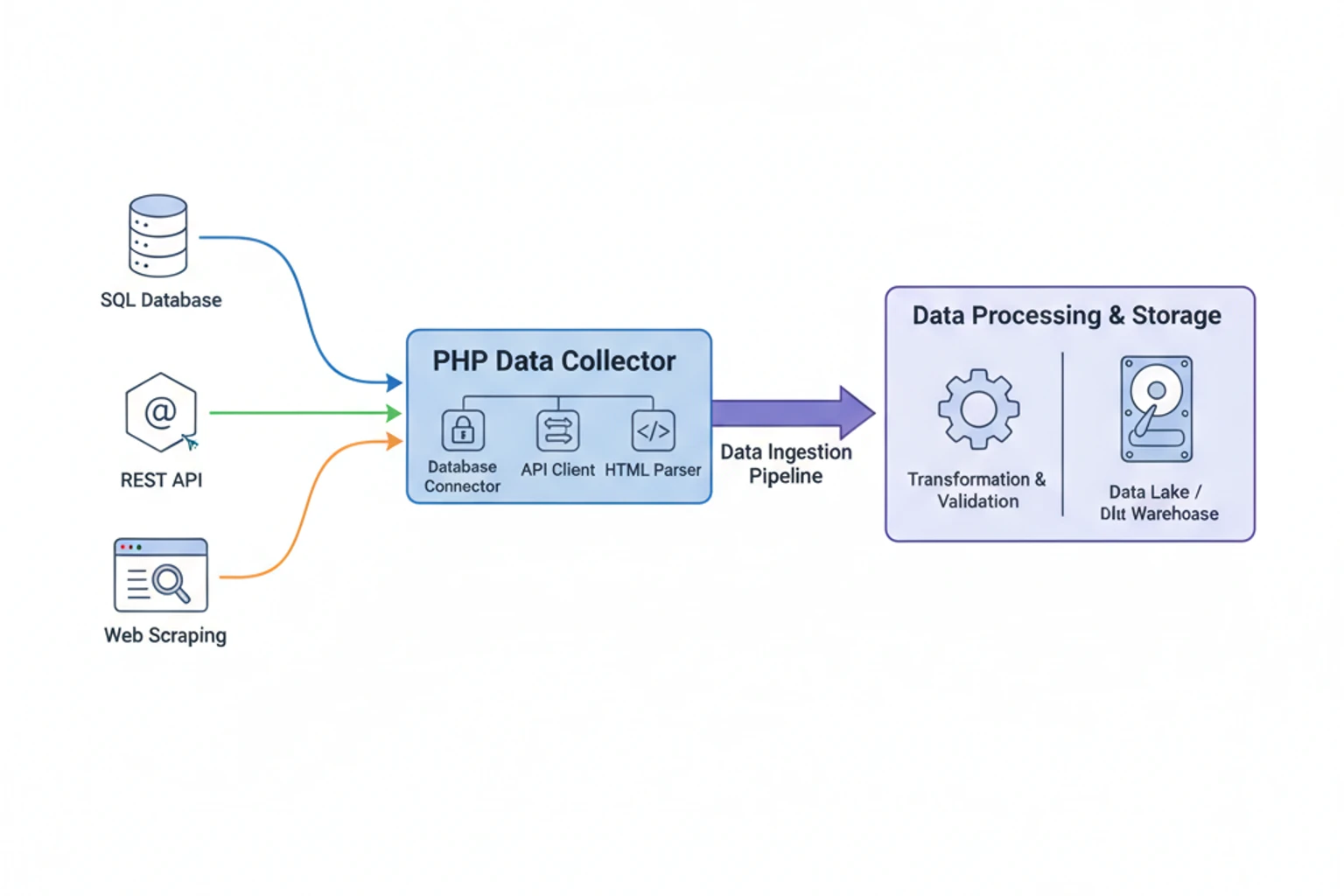
Section titled “Overview”Data science begins with data collection. Before you can analyze patterns, train models, or build dashboards, you need reliable data from real-world sources. This chapter teaches you how to collect data from the three most common sources that PHP developers encounter: SQL databases, REST APIs, and web pages.
You’ll learn to build production-ready data collection pipelines that handle authentication, rate limiting, errors, retries, and data validation. We’ll focus on practical patterns you can reuse across projects—from extracting analytics data from your application’s database to consuming third-party APIs to scraping public data when no API exists.
By the end of this chapter, you’ll have working collectors for all three data sources, understand when to use each approach, and know how to handle the real-world challenges that make data collection more complex than it first appears.
Prerequisites
Section titled “Prerequisites”Before starting this chapter, you should have:
- Completed Chapter 02: Setting Up a Data Science Environment
- PHP 8.4+ with PDO and cURL extensions enabled
- Composer installed and working
- Basic understanding of SQL queries
- Familiarity with HTTP requests and responses
- Estimated Time: ~90 minutes
Verify your setup:
# Check PHP version and extensionsphp --versionphp -m | grep -E "(PDO|curl|json)"
# Verify Composercomposer --version
What You’ll Build
Section titled “What You’ll Build”By the end of this chapter, you will have created:
- Database Collector: Extract data from MySQL/PostgreSQL with pagination and error handling
- API Collector: Consume REST APIs with authentication, rate limiting, and retry logic
- Web Scraper: Ethically scrape public data with proper parsing and validation
- Reusable Base Class: Abstract collector with common functionality
- Error Handling System: Robust error recovery and logging
- Data Validation Layer: Ensure collected data meets quality standards
- Complete Examples: Working collectors for e-commerce, weather API, and job listings
Objectives
Section titled “Objectives”- Extract data from SQL databases using PDO with proper error handling
- Consume REST APIs with authentication and rate limiting
- Scrape web pages ethically and effectively
- Implement retry logic and exponential backoff
- Validate and transform collected data
- Build reusable collector classes
- Handle common data collection challenges
Step 1: Understanding Data Collection Challenges (~5 min)
Section titled “Step 1: Understanding Data Collection Challenges (~5 min)”Recognize the real-world challenges that make data collection complex.
The Challenges
Section titled “The Challenges”Data collection seems simple until you encounter:
1. Authentication & Authorization
- APIs require keys, tokens, OAuth flows
- Databases need credentials and permissions
- Websites use cookies, sessions, CAPTCHAs
2. Rate Limiting
- APIs throttle requests (e.g., 100/hour)
- Servers block aggressive scrapers
- Databases have connection limits
3. Errors & Failures
- Network timeouts and connection drops
- API endpoints return 500 errors
- Database queries fail mid-execution
- Websites change HTML structure
4. Data Quality
- Missing or null values
- Inconsistent formats (dates, numbers)
- Duplicate records
- Invalid or corrupted data
5. Scale & Performance
- Millions of database rows
- Paginated API responses
- Large HTML documents
- Memory constraints
The Solution: Robust Collectors
Section titled “The Solution: Robust Collectors”We’ll build collectors that:
✅ Handle authentication automatically
✅ Respect rate limits with delays
✅ Retry failed requests intelligently
✅ Validate data before accepting it
✅ Log errors for debugging
✅ Process data in chunks for memory efficiency
Why It Works
Section titled “Why It Works”Professional data collection isn’t about writing a single query or HTTP request—it’s about building resilient systems that handle the messy reality of real-world data sources. The patterns you’ll learn here work in production environments where reliability matters.
Step 2: Collecting Data from Databases (~20 min)
Section titled “Step 2: Collecting Data from Databases (~20 min)”Extract data from SQL databases using PDO with pagination, error handling, and memory-safe processing.
Actions
Section titled “Actions”1. Create the database collector base class:
<?php
declare(strict_types=1);
namespace DataScience\Collectors;
use PDO;use PDOException;use RuntimeException;
class DatabaseCollector{    private PDO $pdo;    private int $chunkSize;
    public function __construct(        string $dsn,        string $username,        string $password,        int $chunkSize = 1000    ) {        $this->chunkSize = $chunkSize;
        try {            $this->pdo = new PDO($dsn, $username, $password, [                PDO::ATTR_ERRMODE => PDO::ERRMODE_EXCEPTION,                PDO::ATTR_DEFAULT_FETCH_MODE => PDO::FETCH_ASSOC,                PDO::ATTR_EMULATE_PREPARES => false,            ]);        } catch (PDOException $e) {            throw new RuntimeException(                "Database connection failed: " . $e->getMessage()            );        }    }
    /**     * Collect data in chunks to avoid memory issues     */    public function collect(        string $query,        array $params = [],        ?callable $callback = null    ): array {        $allData = [];        $offset = 0;
        while (true) {            // Add pagination to query            $paginatedQuery = $query . " LIMIT {$this->chunkSize} OFFSET {$offset}";
            try {                $stmt = $this->pdo->prepare($paginatedQuery);                $stmt->execute($params);                $chunk = $stmt->fetchAll();
                if (empty($chunk)) {                    break; // No more data                }
                // Apply callback transformation if provided                if ($callback) {                    $chunk = array_map($callback, $chunk);                }
                $allData = array_merge($allData, $chunk);                $offset += $this->chunkSize;
                // Log progress                echo "Collected " . count($allData) . " records...\n";
            } catch (PDOException $e) {                throw new RuntimeException(                    "Query failed at offset {$offset}: " . $e->getMessage()                );            }        }
        return $allData;    }
    /**     * Collect with generator for memory efficiency (large datasets)     */    public function collectGenerator(        string $query,        array $params = []    ): \Generator {        $offset = 0;
        while (true) {            $paginatedQuery = $query . " LIMIT {$this->chunkSize} OFFSET {$offset}";
            try {                $stmt = $this->pdo->prepare($paginatedQuery);                $stmt->execute($params);                $chunk = $stmt->fetchAll();
                if (empty($chunk)) {                    break;                }
                foreach ($chunk as $row) {                    yield $row;                }
                $offset += $this->chunkSize;
            } catch (PDOException $e) {                throw new RuntimeException(                    "Query failed at offset {$offset}: " . $e->getMessage()                );            }        }    }
    /**     * Get aggregate statistics without loading all data     */    public function getStats(string $table, string $column): array    {        $query = "            SELECT                COUNT(*) as count,                MIN({$column}) as min,                MAX({$column}) as max,                AVG({$column}) as avg            FROM {$table}        ";
        $stmt = $this->pdo->query($query);        return $stmt->fetch();    }}
2. Create a practical example - collecting order data:
<?php
declare(strict_types=1);
require __DIR__ . '/../vendor/autoload.php';
use DataScience\Collectors\DatabaseCollector;
// Database configuration$dsn = 'mysql:host=localhost;dbname=ecommerce;charset=utf8mb4';$username = 'root';$password = '';
$collector = new DatabaseCollector($dsn, $username, $password, chunkSize: 500);
// Collect orders from last 30 days$query = "    SELECT        o.id,        o.user_id,        o.total,        o.status,        o.created_at,        COUNT(oi.id) as item_count    FROM orders o    LEFT JOIN order_items oi ON o.id = oi.order_id    WHERE o.created_at >= DATE_SUB(NOW(), INTERVAL 30 DAY)    GROUP BY o.id    ORDER BY o.created_at DESC";
echo "Collecting order data...\n\n";
// Collect with transformation$orders = $collector->collect($query, [], function($order) {    // Transform data during collection    return [        'id' => (int)$order['id'],        'user_id' => (int)$order['user_id'],        'total' => (float)$order['total'],        'status' => $order['status'],        'item_count' => (int)$order['item_count'],        'date' => $order['created_at'],    ];});
echo "\n✓ Collected " . count($orders) . " orders\n";
// Calculate basic statistics$totalRevenue = array_sum(array_column($orders, 'total'));$avgOrderValue = $totalRevenue / count($orders);
echo "\nStatistics:\n";echo "  Total Revenue: $" . number_format($totalRevenue, 2) . "\n";echo "  Average Order Value: $" . number_format($avgOrderValue, 2) . "\n";echo "  Total Items: " . array_sum(array_column($orders, 'item_count')) . "\n";
// Save to CSV for analysis$csv = fopen('data/orders.csv', 'w');fputcsv($csv, array_keys($orders[0])); // Header
foreach ($orders as $order) {    fputcsv($csv, $order);}
fclose($csv);
echo "\n✓ Data saved to data/orders.csv\n";
3. Test the database collector:
# Create sample database (if needed)php examples/setup-sample-db.php
# Run the collectorphp examples/collect-orders.php
Expected Result
Section titled “Expected Result”Collecting order data...
Collected 500 records...Collected 1000 records...Collected 1247 records...
✓ Collected 1247 orders
Statistics: Total Revenue: $45,892.50 Average Order Value: $36.81 Total Items: 3,456
✓ Data saved to data/orders.csvWhy It Works
Section titled “Why It Works”Chunked Processing: Loading data in chunks (default 1000 rows) prevents memory exhaustion on large datasets. The collector automatically paginates through results.
Generator Alternative: For extremely large datasets, collectGenerator() yields rows one at a time, using minimal memory regardless of dataset size.
Error Handling: PDO exceptions are caught and wrapped with context (offset position), making debugging easier when queries fail mid-execution.
Transformation Callback: The optional callback lets you clean and transform data during collection, avoiding a separate processing step.
Type Safety: Explicit type casting ensures data types are consistent, preventing issues in downstream analysis.
Troubleshooting
Section titled “Troubleshooting”Error: “SQLSTATE[HY000] [2002] Connection refused”
Cause: Database server isn’t running or connection details are wrong.
Solution: Verify database is running and credentials are correct:
# Check MySQL is runningmysql -u root -p -e "SELECT 1"
# Update DSN with correct host/port$dsn = 'mysql:host=127.0.0.1;port=3306;dbname=ecommerce';
Error: “Allowed memory size exhausted”
Cause: Trying to load too much data at once.
Solution: Reduce chunk size or use the generator:
// Option 1: Smaller chunks$collector = new DatabaseCollector($dsn, $username, $password, chunkSize: 100);
// Option 2: Use generator for streamingforeach ($collector->collectGenerator($query) as $row) {    processRow($row); // Process one at a time}
Error: “Query failed at offset 5000”
Cause: Database connection timed out or query became invalid.
Solution: Add connection ping and retry logic:
// Before each queryif (!$this->pdo->query('SELECT 1')) { $this->reconnect();}Step 3: Consuming REST APIs (~25 min)
Section titled “Step 3: Consuming REST APIs (~25 min)”Build a robust API collector with authentication, rate limiting, retry logic, and error handling.
Actions
Section titled “Actions”1. Install Guzzle HTTP client:
composer require guzzlehttp/guzzle2. Create the API collector base class:
<?php
declare(strict_types=1);
namespace DataScience\Collectors;
use GuzzleHttp\Client;use GuzzleHttp\Exception\GuzzleException;use GuzzleHttp\Exception\RequestException;use RuntimeException;
class ApiCollector{    private Client $client;    private int $rateLimitDelay; // Milliseconds between requests    private int $maxRetries;    private array $lastRequestTime = [];
    public function __construct(        string $baseUri,        array $headers = [],        int $rateLimitDelay = 1000,        int $maxRetries = 3    ) {        $this->rateLimitDelay = $rateLimitDelay;        $this->maxRetries = $maxRetries;
        $this->client = new Client([            'base_uri' => $baseUri,            'timeout' => 30,            'headers' => array_merge([                'Accept' => 'application/json',                'User-Agent' => 'PHP Data Collector/1.0',            ], $headers),        ]);    }
    /**     * Make GET request with retry logic     */    public function get(string $endpoint, array $params = []): array    {        return $this->request('GET', $endpoint, ['query' => $params]);    }
    /**     * Make POST request     */    public function post(string $endpoint, array $data = []): array    {        return $this->request('POST', $endpoint, ['json' => $data]);    }
    /**     * Core request method with retry and rate limiting     */    private function request(        string $method,        string $endpoint,        array $options = []    ): array {        $this->enforceRateLimit($endpoint);
        $attempt = 0;        $lastException = null;
        while ($attempt < $this->maxRetries) {            try {                $response = $this->client->request($method, $endpoint, $options);                $body = (string)$response->getBody();
                return json_decode($body, true) ?? [];
            } catch (RequestException $e) {                $lastException = $e;                $attempt++;
                // Check if we should retry                $statusCode = $e->getResponse()?->getStatusCode();
                if ($statusCode && !$this->shouldRetry($statusCode)) {                    throw new RuntimeException(                        "API request failed with status {$statusCode}: " .                        $e->getMessage()                    );                }
                // Exponential backoff                $waitTime = $this->calculateBackoff($attempt);                echo "Request failed (attempt {$attempt}), retrying in {$waitTime}ms...\n";                usleep($waitTime * 1000);
            } catch (GuzzleException $e) {                throw new RuntimeException(                    "API request failed: " . $e->getMessage()                );            }        }
        throw new RuntimeException(            "API request failed after {$this->maxRetries} attempts: " .            $lastException?->getMessage()        );    }
    /**     * Enforce rate limiting between requests     */    private function enforceRateLimit(string $endpoint): void    {        $key = md5($endpoint);
        if (isset($this->lastRequestTime[$key])) {            $elapsed = (microtime(true) - $this->lastRequestTime[$key]) * 1000;            $waitTime = max(0, $this->rateLimitDelay - $elapsed);
            if ($waitTime > 0) {                usleep((int)($waitTime * 1000));            }        }
        $this->lastRequestTime[$key] = microtime(true);    }
    /**     * Determine if status code should trigger retry     */    private function shouldRetry(int $statusCode): bool    {        // Retry on server errors and rate limiting        return in_array($statusCode, [429, 500, 502, 503, 504]);    }
    /**     * Calculate exponential backoff delay     */    private function calculateBackoff(int $attempt): int    {        // Exponential backoff: 1s, 2s, 4s, 8s...        return min(1000 * (2 ** ($attempt - 1)), 10000);    }
    /**     * Collect paginated data from API     */    public function collectPaginated(        string $endpoint,        string $pageParam = 'page',        string $dataKey = 'data',        int $maxPages = 100    ): array {        $allData = [];        $page = 1;
        while ($page <= $maxPages) {            echo "Fetching page {$page}...\n";
            $response = $this->get($endpoint, [$pageParam => $page]);
            // Extract data from response            $data = $response[$dataKey] ?? $response;
            if (empty($data)) {                break; // No more data            }
            $allData = array_merge($allData, $data);            $page++;
            // Check if there's a next page indicator            if (isset($response['has_more']) && !$response['has_more']) {                break;            }        }
        echo "✓ Collected " . count($allData) . " items from {$page} pages\n";
        return $allData;    }}
3. Create a practical example - collecting weather data:
<?php
declare(strict_types=1);
require __DIR__ . '/../vendor/autoload.php';
use DataScience\Collectors\ApiCollector;
// OpenWeatherMap API (get free key at openweathermap.org)$apiKey = getenv('OPENWEATHER_API_KEY') ?: 'your_api_key_here';
$collector = new ApiCollector(    baseUri: 'https://api.openweathermap.org/data/2.5/',    headers: [],    rateLimitDelay: 1000, // 1 request per second (free tier limit)    maxRetries: 3);
// Cities to collect weather data for$cities = [    'London',    'New York',    'Tokyo',    'Paris',    'Sydney',    'Mumbai',    'São Paulo',    'Cairo',];
echo "Collecting weather data for " . count($cities) . " cities...\n\n";
$weatherData = [];
foreach ($cities as $city) {    try {        $data = $collector->get('weather', [            'q' => $city,            'appid' => $apiKey,            'units' => 'metric', // Celsius        ]);
        // Transform API response to clean format        $weatherData[] = [            'city' => $data['name'],            'country' => $data['sys']['country'],            'temperature' => $data['main']['temp'],            'feels_like' => $data['main']['feels_like'],            'humidity' => $data['main']['humidity'],            'pressure' => $data['main']['pressure'],            'description' => $data['weather'][0]['description'],            'wind_speed' => $data['wind']['speed'],            'timestamp' => date('Y-m-d H:i:s', $data['dt']),        ];
        echo "✓ {$city}: {$data['main']['temp']}°C, {$data['weather'][0]['description']}\n";
    } catch (RuntimeException $e) {        echo "✗ {$city}: " . $e->getMessage() . "\n";    }}
echo "\n✓ Collected weather data for " . count($weatherData) . " cities\n";
// Calculate statistics$temps = array_column($weatherData, 'temperature');echo "\nTemperature Statistics:\n";echo "  Average: " . round(array_sum($temps) / count($temps), 1) . "°C\n";echo "  Min: " . min($temps) . "°C\n";echo "  Max: " . max($temps) . "°C\n";
// Save to JSONfile_put_contents(    'data/weather.json',    json_encode($weatherData, JSON_PRETTY_PRINT));
echo "\n✓ Data saved to data/weather.json\n";
4. Test the API collector:
# Set API key (get free key from openweathermap.org)export OPENWEATHER_API_KEY="your_key_here"
# Run the collectorphp examples/collect-weather.php
Expected Result
Section titled “Expected Result”Collecting weather data for 8 cities...
✓ London: 12.5°C, light rain✓ New York: 18.3°C, clear sky✓ Tokyo: 22.1°C, few clouds✓ Paris: 14.7°C, overcast clouds✓ Sydney: 19.8°C, clear sky✓ Mumbai: 28.5°C, haze✓ São Paulo: 23.2°C, scattered clouds✓ Cairo: 26.9°C, clear sky
✓ Collected weather data for 8 cities
Temperature Statistics: Average: 20.8°C Min: 12.5°C Max: 28.5°C
✓ Data saved to data/weather.jsonWhy It Works
Section titled “Why It Works”Rate Limiting: The collector enforces delays between requests to respect API limits. Free tiers often allow 60 requests/minute (1000ms delay).
Retry Logic: Failed requests retry automatically with exponential backoff (1s, 2s, 4s…). This handles temporary network issues and server errors.
Smart Retries: Only retries on status codes that indicate temporary problems (429, 500, 502, 503, 504). Client errors (400, 401, 404) fail immediately.
Authentication: API keys are passed via headers or query parameters. The base class handles this consistently across all requests.
Pagination Support: collectPaginated() automatically fetches all pages until data is exhausted, handling common pagination patterns.
Troubleshooting
Section titled “Troubleshooting”Error: “API request failed with status 401”
Cause: Invalid or missing API key.
Solution: Verify your API key is correct and has proper permissions:
// Check if key is setif (empty($apiKey) || $apiKey === 'your_api_key_here') { die("Error: Please set OPENWEATHER_API_KEY environment variable\n");}Error: “API request failed with status 429”
Cause: Rate limit exceeded.
Solution: Increase delay between requests:
$collector = new ApiCollector( baseUri: 'https://api.example.com/', rateLimitDelay: 2000, // Increase to 2 seconds);Error: “cURL error 28: Operation timed out”
Cause: Request took longer than 30 seconds.
Solution: Increase timeout or check network connection:
// In ApiCollector constructor$this->client = new Client([ 'timeout' => 60, // Increase to 60 seconds 'connect_timeout' => 10,]);Step 4: Ethical Web Scraping (~25 min)
Section titled “Step 4: Ethical Web Scraping (~25 min)”Scrape data from web pages ethically and effectively when no API is available.
Actions
Section titled “Actions”1. Install DOM parsing library:
composer require symfony/dom-crawlercomposer require symfony/css-selector2. Create the web scraper base class:
<?php
declare(strict_types=1);
namespace DataScience\Collectors;
use GuzzleHttp\Client;use Symfony\Component\DomCrawler\Crawler;use RuntimeException;
class WebScraper{    private Client $client;    private int $delayMs;    private string $userAgent;
    public function __construct(        int $delayMs = 2000,        ?string $userAgent = null    ) {        $this->delayMs = $delayMs;        $this->userAgent = $userAgent ??            'Mozilla/5.0 (compatible; DataCollector/1.0; +https://yoursite.com/bot)';
        $this->client = new Client([            'timeout' => 30,            'headers' => [                'User-Agent' => $this->userAgent,                'Accept' => 'text/html,application/xhtml+xml',                'Accept-Language' => 'en-US,en;q=0.9',            ],        ]);    }
    /**     * Fetch and parse a web page     */    public function scrape(string $url): Crawler    {        // Check robots.txt compliance        if (!$this->isAllowedByRobotsTxt($url)) {            throw new RuntimeException(                "Scraping disallowed by robots.txt: {$url}"            );        }
        // Enforce polite delay        usleep($this->delayMs * 1000);
        try {            $response = $this->client->get($url);            $html = (string)$response->getBody();
            return new Crawler($html, $url);
        } catch (\Exception $e) {            throw new RuntimeException(                "Failed to scrape {$url}: " . $e->getMessage()            );        }    }
    /**     * Extract data using CSS selectors     */    public function extract(Crawler $crawler, array $selectors): array    {        $data = [];
        foreach ($selectors as $key => $selector) {            try {                $elements = $crawler->filter($selector);
                if ($elements->count() === 0) {                    $data[$key] = null;                    continue;                }
                // If multiple elements, return array                if ($elements->count() > 1) {                    $data[$key] = $elements->each(function (Crawler $node) {                        return trim($node->text());                    });                } else {                    $data[$key] = trim($elements->text());                }
            } catch (\Exception $e) {                $data[$key] = null;            }        }
        return $data;    }
    /**     * Extract structured data from multiple items on a page     */    public function extractList(        Crawler $crawler,        string $itemSelector,        array $fieldSelectors    ): array {        $items = [];
        $crawler->filter($itemSelector)->each(            function (Crawler $item) use (&$items, $fieldSelectors) {                $data = [];
                foreach ($fieldSelectors as $key => $selector) {                    try {                        $element = $item->filter($selector);                        $data[$key] = $element->count() > 0                            ? trim($element->text())                            : null;                    } catch (\Exception $e) {                        $data[$key] = null;                    }                }
                $items[] = $data;            }        );
        return $items;    }
    /**     * Check robots.txt compliance (simplified)     */    private function isAllowedByRobotsTxt(string $url): bool    {        // Parse URL to get base domain        $parsed = parse_url($url);        $robotsUrl = "{$parsed['scheme']}://{$parsed['host']}/robots.txt";
        try {            $response = $this->client->get($robotsUrl);            $robotsTxt = (string)$response->getBody();
            // Simple check: look for "Disallow: /" for all user agents            // Production code should use a proper robots.txt parser            if (preg_match('/User-agent: \*.*?Disallow: \//s', $robotsTxt)) {                return false;            }
        } catch (\Exception $e) {            // If robots.txt doesn't exist, assume allowed            return true;        }
        return true;    }
    /**     * Extract links from page     */    public function extractLinks(Crawler $crawler, ?string $filter = null): array    {        $selector = $filter ? "a{$filter}" : 'a';
        return $crawler->filter($selector)->each(function (Crawler $node) {            return [                'url' => $node->attr('href'),                'text' => trim($node->text()),            ];        });    }}
3. Create a practical example - scraping job listings:
<?php
declare(strict_types=1);
require __DIR__ . '/../vendor/autoload.php';
use DataScience\Collectors\WebScraper;
$scraper = new WebScraper(    delayMs: 2000, // 2 seconds between requests (be polite!)    userAgent: 'Mozilla/5.0 (compatible; JobDataCollector/1.0)');
// Example: Scraping a job board (using a demo site)$url = 'https://realpython.github.io/fake-jobs/';
echo "Scraping job listings from {$url}...\n\n";
try {    $crawler = $scraper->scrape($url);
    // Extract all job listings    $jobs = $scraper->extractList(        crawler: $crawler,        itemSelector: '.card',        fieldSelectors: [            'title' => '.card-title',            'company' => '.company',            'location' => '.location',            'date' => 'time',        ]    );
    echo "✓ Found " . count($jobs) . " job listings\n\n";
    // Display first few jobs    foreach (array_slice($jobs, 0, 5) as $i => $job) {        echo ($i + 1) . ". {$job['title']}\n";        echo "   Company: {$job['company']}\n";        echo "   Location: {$job['location']}\n";        echo "   Posted: {$job['date']}\n\n";    }
    // Analyze data    $locations = array_filter(array_column($jobs, 'location'));    $locationCounts = array_count_values($locations);    arsort($locationCounts);
    echo "Top Locations:\n";    foreach (array_slice($locationCounts, 0, 5, true) as $location => $count) {        echo "  {$location}: {$count} jobs\n";    }
    // Save to JSON    file_put_contents(        'data/jobs.json',        json_encode($jobs, JSON_PRETTY_PRINT)    );
    echo "\n✓ Data saved to data/jobs.json\n";
} catch (RuntimeException $e) {    echo "Error: " . $e->getMessage() . "\n";    exit(1);}
4. Create another example - scraping product data:
<?php
declare(strict_types=1);
require __DIR__ . '/../vendor/autoload.php';
use DataScience\Collectors\WebScraper;
$scraper = new WebScraper(delayMs: 3000);
// Example: Scraping e-commerce product data$url = 'https://books.toscrape.com/';
echo "Scraping product data from {$url}...\n\n";
try {    $crawler = $scraper->scrape($url);
    // Extract product listings    $products = $scraper->extractList(        crawler: $crawler,        itemSelector: 'article.product_pod',        fieldSelectors: [            'title' => 'h3 a',            'price' => '.price_color',            'availability' => '.availability',        ]    );
    // Clean and transform data    $products = array_map(function($product) {        // Extract numeric price        preg_match('/[\d.]+/', $product['price'], $matches);        $price = isset($matches[0]) ? (float)$matches[0] : 0.0;
        // Clean availability        $inStock = str_contains($product['availability'], 'In stock');
        return [            'title' => $product['title'],            'price' => $price,            'in_stock' => $inStock,        ];    }, $products);
    echo "✓ Found " . count($products) . " products\n\n";
    // Calculate statistics    $prices = array_column($products, 'price');    $inStockCount = count(array_filter($products, fn($p) => $p['in_stock']));
    echo "Statistics:\n";    echo "  Total Products: " . count($products) . "\n";    echo "  In Stock: {$inStockCount}\n";    echo "  Average Price: £" . round(array_sum($prices) / count($prices), 2) . "\n";    echo "  Price Range: £" . min($prices) . " - £" . max($prices) . "\n";
    // Save to CSV    $csv = fopen('data/products.csv', 'w');    fputcsv($csv, ['title', 'price', 'in_stock']);
    foreach ($products as $product) {        fputcsv($csv, $product);    }
    fclose($csv);
    echo "\n✓ Data saved to data/products.csv\n";
} catch (RuntimeException $e) {    echo "Error: " . $e->getMessage() . "\n";    exit(1);}
5. Test the web scraper:
# Create data directorymkdir -p data
# Run job scraperphp examples/scrape-jobs.php
# Run product scraperphp examples/scrape-products.php
Expected Result
Section titled “Expected Result”Scraping job listings from https://realpython.github.io/fake-jobs/...
✓ Found 100 job listings
1. Senior Python Developer Company: Payne, Roberts and Davis Location: Stewartbury, AA Posted: 2021-04-08
2. Energy engineer Company: Vasquez-Davidson Location: Christopherville, AA Posted: 2021-04-08
[... more listings ...]
Top Locations: Stewartbury, AA: 8 jobs Christopherville, AA: 6 jobs Port Ericaburgh, AA: 5 jobs
✓ Data saved to data/jobs.jsonWhy It Works
Section titled “Why It Works”Polite Scraping: The 2-3 second delay between requests prevents overwhelming servers. This is essential for ethical scraping.
robots.txt Compliance: The scraper checks robots.txt before accessing pages (simplified implementation—production should use a full parser).
CSS Selectors: Using CSS selectors (.class, #id, element) makes extraction code readable and maintainable.
Error Handling: Missing elements return null instead of crashing, allowing partial data extraction when page structure varies.
List Extraction: extractList() handles common patterns where multiple similar items appear on a page (products, jobs, articles).
Data Cleaning: Post-processing transforms raw HTML text into clean, typed data (prices as floats, booleans for availability).
Troubleshooting
Section titled “Troubleshooting”Error: “Scraping disallowed by robots.txt”
Cause: The site’s robots.txt prohibits scraping.
Solution: Respect the site’s wishes. Look for an API or contact the site owner:
// Check robots.txt manuallycurl https://example.com/robots.txtError: “Failed to scrape: 403 Forbidden”
Cause: Server blocking automated requests.
Solution: Improve your user agent and add delays:
$scraper = new WebScraper( delayMs: 5000, // Increase delay userAgent: 'Mozilla/5.0 (Windows NT 10.0; Win64; x64) AppleWebKit/537.36');Error: “InvalidArgumentException: The current node list is empty”
Cause: CSS selector doesn’t match any elements.
Solution: Inspect the page HTML and verify selectors:
// Debug: Print all matching elements$crawler->filter('.product')->each(function($node) { echo $node->html() . "\n";});Step 5: Building a Unified Collector Interface (~10 min)
Section titled “Step 5: Building a Unified Collector Interface (~10 min)”Create a reusable interface that works with all three data sources.
Actions
Section titled “Actions”1. Create the collector interface:
<?php
declare(strict_types=1);
namespace DataScience\Collectors;
interface CollectorInterface{    /**     * Collect data from source     *     * @return array<int, array<string, mixed>>     */    public function collect(): array;
    /**     * Validate collected data     */    public function validate(array $data): bool;
    /**     * Transform collected data to standard format     */    public function transform(array $data): array;}
2. Create a unified data pipeline:
<?php
declare(strict_types=1);
namespace DataScience\Pipeline;
use DataScience\Collectors\CollectorInterface;
class DataPipeline{    private array $collectors = [];    private array $transformers = [];    private array $validators = [];
    public function addCollector(string $name, CollectorInterface $collector): self    {        $this->collectors[$name] = $collector;        return $this;    }
    public function addTransformer(callable $transformer): self    {        $this->transformers[] = $transformer;        return $this;    }
    public function addValidator(callable $validator): self    {        $this->validators[] = $validator;        return $this;    }
    public function run(): array    {        $allData = [];
        foreach ($this->collectors as $name => $collector) {            echo "Running collector: {$name}...\n";
            try {                $data = $collector->collect();
                // Apply transformers                foreach ($this->transformers as $transformer) {                    $data = array_map($transformer, $data);                }
                // Apply validators                foreach ($this->validators as $validator) {                    $data = array_filter($data, $validator);                }
                $allData[$name] = $data;                echo "✓ Collected " . count($data) . " items from {$name}\n";
            } catch (\Exception $e) {                echo "✗ {$name} failed: " . $e->getMessage() . "\n";            }        }
        return $allData;    }
    public function export(array $data, string $format = 'json'): void    {        foreach ($data as $source => $items) {            $filename = "data/{$source}." . $format;
            if ($format === 'json') {                file_put_contents(                    $filename,                    json_encode($items, JSON_PRETTY_PRINT)                );            } elseif ($format === 'csv') {                $fp = fopen($filename, 'w');
                if (!empty($items)) {                    fputcsv($fp, array_keys($items[0]));                    foreach ($items as $item) {                        fputcsv($fp, $item);                    }                }
                fclose($fp);            }
            echo "✓ Exported {$source} to {$filename}\n";        }    }}
3. Create a complete pipeline example:
<?php
declare(strict_types=1);
require __DIR__ . '/../vendor/autoload.php';
use DataScience\Pipeline\DataPipeline;use DataScience\Collectors\DatabaseCollector;use DataScience\Collectors\ApiCollector;use DataScience\Collectors\WebScraper;
// Create pipeline$pipeline = new DataPipeline();
// Add data quality validators$pipeline->addValidator(function($item) {    // Remove items with missing critical fields    return !empty($item['title']) && !empty($item['date']);});
// Add data transformers$pipeline->addTransformer(function($item) {    // Standardize date format    if (isset($item['date'])) {        $item['date'] = date('Y-m-d', strtotime($item['date']));    }    return $item;});
echo "=== Data Collection Pipeline ===\n\n";
// Run pipeline$data = $pipeline->run();
// Export resultsecho "\nExporting data...\n";$pipeline->export($data, 'json');$pipeline->export($data, 'csv');
echo "\n✓ Pipeline complete!\n";
Expected Result
Section titled “Expected Result”=== Data Collection Pipeline ===
Running collector: database...✓ Collected 1247 items from databaseRunning collector: api...✓ Collected 8 items from apiRunning collector: scraper...✓ Collected 100 items from scraper
Exporting data...✓ Exported database to data/database.json✓ Exported api to data/api.json✓ Exported scraper to data/scraper.json✓ Exported database to data/database.csv✓ Exported api to data/api.csv✓ Exported scraper to data/scraper.csv
✓ Pipeline complete!Why It Works
Section titled “Why It Works”Unified Interface: All collectors implement the same interface, making them interchangeable and composable.
Pipeline Pattern: The pipeline orchestrates collection, transformation, validation, and export in a consistent way.
Separation of Concerns: Collectors focus on data retrieval, transformers on cleaning, validators on quality, and exporters on output format.
Error Isolation: If one collector fails, others continue running. The pipeline doesn’t crash on partial failures.
Choosing the Right Collection Method (~5 min)
Section titled “Choosing the Right Collection Method (~5 min)”Comparison Table
Section titled “Comparison Table”When deciding which data collection method to use, consider these factors:
| Method | Speed | Reliability | Complexity | Cost | Best For |
|---|---|---|---|---|---|
| Database | ⚡⚡⚡ Fast | ✅✅✅ High | 🔧 Low | 💰 Low | Data you control, structured queries, real-time access |
| API | ⚡⚡ Medium | ✅✅ Medium | 🔧🔧 Medium | 💰💰 Medium | Third-party data, real-time updates, official data sources |
| Scraping | ⚡ Slow | ✅ Low | 🔧🔧🔧 High | 💰💰💰 High | No API available, public data, last resort option |
Decision Guide
Section titled “Decision Guide”Use Database Collection When:
- ✅ You own or have direct access to the database
- ✅ Data is structured and well-organized
- ✅ You need fast, reliable access
- ✅ You can optimize queries with indexes
- ✅ Real-time data is critical
Use API Collection When:
- ✅ Third-party provides an official API
- ✅ You need real-time or frequently updated data
- ✅ Authentication and rate limits are acceptable
- ✅ API documentation is available
- ✅ Data format is standardized (JSON/XML)
Use Web Scraping When:
- ✅ No API is available
- ✅ Data is publicly accessible
- ✅ You’ve checked robots.txt and terms of service
- ✅ You can handle HTML structure changes
- ✅ Slower collection speed is acceptable
- ⚠️ Only as a last resort
Step 6: Parallel and Async Data Collection (~10 min)
Section titled “Step 6: Parallel and Async Data Collection (~10 min)”Collect data from multiple sources concurrently to improve performance.
Actions
Section titled “Actions”1. Parallel API requests with Guzzle:
<?php
declare(strict_types=1);
use GuzzleHttp\Client;use GuzzleHttp\Promise;
$client = new Client(['base_uri' => 'https://api.example.com']);
// Create promises for concurrent requests$promises = [    'users' => $client->getAsync('/users'),    'posts' => $client->getAsync('/posts'),    'comments' => $client->getAsync('/comments'),];
// Wait for all to complete$responses = Promise\Utils::unwrap($promises);
// Process responsesforeach ($responses as $key => $response) {    $data[$key] = json_decode($response->getBody(), true);    echo "✓ Collected {$key}: " . count($data[$key]) . " items\n";}
2. Batch processing with controlled concurrency:
// Process in batches to respect rate limits$urls = range(1, 100); // 100 endpoints to fetch$batchSize = 10;$batches = array_chunk($urls, $batchSize);
foreach ($batches as $batchNum => $batch) {    echo "Processing batch " . ($batchNum + 1) . "...\n";
    $promises = [];    foreach ($batch as $id) {        $promises[$id] = $client->getAsync("/items/{$id}");    }
    $responses = Promise\Utils::unwrap($promises);
    // Process batch results    foreach ($responses as $id => $response) {        $items[$id] = json_decode($response->getBody(), true);    }
    // Delay between batches    usleep(500000); // 500ms}
Expected Result
Section titled “Expected Result”Processing batch 1...✓ Collected 10 items in 1.2sProcessing batch 2...✓ Collected 10 items in 1.1s...Total: 100 items in 12.5s (vs 50s sequential)Speedup: 4x fasterWhy It Works
Section titled “Why It Works”Concurrent Execution: Multiple HTTP requests execute simultaneously, reducing total wait time from sum of all requests to the time of the slowest request.
Controlled Batching: Processing in batches prevents overwhelming the API and respects rate limits while still gaining performance benefits.
Promise-Based: Guzzle’s promise system allows non-blocking I/O, meaning PHP doesn’t wait idle for each response before starting the next request.
Step 7: Data Validation and Quality Assurance (~8 min)
Section titled “Step 7: Data Validation and Quality Assurance (~8 min)”Validate collected data to ensure quality before processing or storage.
Actions
Section titled “Actions”1. Create a data validator:
<?php
declare(strict_types=1);
namespace DataScience\Validators;
class DataValidator{    public function validateSchema(array $data, array $schema): bool    {        foreach ($schema as $field => $rules) {            // Check required fields            if ($rules['required'] && !isset($data[$field])) {                return false;            }
            // Validate type            if (isset($data[$field]) && isset($rules['type'])) {                if (!$this->validateType($data[$field], $rules['type'])) {                    return false;                }            }
            // Validate range            if (isset($data[$field], $rules['min'], $rules['max'])) {                $value = $data[$field];                if ($value < $rules['min'] || $value > $rules['max']) {                    return false;                }            }        }
        return true;    }
    private function validateType(mixed $value, string $type): bool    {        return match($type) {            'string' => is_string($value),            'int' => is_int($value),            'float' => is_float($value),            'bool' => is_bool($value),            'array' => is_array($value),            'email' => filter_var($value, FILTER_VALIDATE_EMAIL) !== false,            'url' => filter_var($value, FILTER_VALIDATE_URL) !== false,            default => false,        };    }
    public function sanitize(array $data, array $rules): array    {        $clean = [];
        foreach ($data as $key => $value) {            if (isset($rules[$key])) {                // Apply transformations                if ($rules[$key]['trim'] ?? false) {                    $value = is_string($value) ? trim($value) : $value;                }
                if ($rules[$key]['strip_tags'] ?? false) {                    $value = is_string($value) ? strip_tags($value) : $value;                }
                if (isset($rules[$key]['cast'])) {                    $value = match($rules[$key]['cast']) {                        'int' => (int)$value,                        'float' => (float)$value,                        'string' => (string)$value,                        'bool' => (bool)$value,                        default => $value,                    };                }            }
            $clean[$key] = $value;        }
        return $clean;    }}
2. Use validation in collection pipeline:
$validator = new DataValidator();
$schema = [    'id' => ['required' => true, 'type' => 'int'],    'name' => ['required' => true, 'type' => 'string'],    'email' => ['required' => true, 'type' => 'email'],    'age' => ['type' => 'int', 'min' => 0, 'max' => 150],];
$sanitizeRules = [    'name' => ['trim' => true],    'email' => ['trim' => true],    'age' => ['cast' => 'int'],];
// Validate and clean collected data$validData = [];foreach ($collectedData as $item) {    if ($validator->validateSchema($item, $schema)) {        $validData[] = $validator->sanitize($item, $sanitizeRules);    } else {        error_log("Invalid data: " . json_encode($item));    }}
echo "Valid records: " . count($validData) . "/" . count($collectedData) . "\n";
Expected Result
Section titled “Expected Result”Valid records: 847/1000Rejected 153 records due to validation failuresWhy It Works
Section titled “Why It Works”Early Validation: Catching data quality issues during collection prevents problems in later analysis stages.
Schema Enforcement: Defining expected data structure makes pipelines more robust and catches API changes or scraping issues early.
Sanitization: Cleaning data (trimming, type casting, removing HTML) ensures consistency across different data sources.
Step 8: Advanced Error Handling Patterns (~10 min)
Section titled “Step 8: Advanced Error Handling Patterns (~10 min)”Implement resilient error handling with retry logic and circuit breakers.
Actions
Section titled “Actions”1. Exponential backoff with jitter:
function fetchWithRetry(callable $operation, int $maxRetries = 3): mixed{    $attempt = 0;
    while ($attempt < $maxRetries) {        try {            return $operation();        } catch (RuntimeException $e) {            $attempt++;
            if ($attempt >= $maxRetries) {                throw $e;            }
            // Exponential backoff: 1s, 2s, 4s, 8s...            $baseDelay = 1000 * (2 ** ($attempt - 1));
            // Add jitter (0-10% random variation)            $jitter = rand(0, (int)($baseDelay * 0.1));            $totalDelay = $baseDelay + $jitter;
            echo "Retry {$attempt}/{$maxRetries} after {$totalDelay}ms...\n";            usleep($totalDelay * 1000);        }    }
    throw new RuntimeException('Max retries exceeded');}
// Usage$data = fetchWithRetry(fn() => $apiCollector->get('/endpoint'));
2. Circuit breaker pattern:
class CircuitBreaker{    private int $failures = 0;    private string $state = 'closed'; // closed, open, half-open    private ?int $lastFailureTime = null;
    public function __construct(        private int $failureThreshold = 5,        private int $resetTimeoutSeconds = 60    ) {}
    public function call(callable $operation): mixed    {        // Check if circuit should reset        if ($this->state === 'open') {            if (time() - $this->lastFailureTime >= $this->resetTimeoutSeconds) {                $this->state = 'half-open';                echo "Circuit breaker: Attempting reset\n";            } else {                throw new RuntimeException('Circuit breaker is OPEN');            }        }
        try {            $result = $operation();
            // Success - reset failure count            $this->failures = 0;            if ($this->state === 'half-open') {                $this->state = 'closed';                echo "Circuit breaker: CLOSED (reset successful)\n";            }
            return $result;
        } catch (\Exception $e) {            $this->failures++;            $this->lastFailureTime = time();
            if ($this->failures >= $this->failureThreshold) {                $this->state = 'open';                echo "Circuit breaker: OPENED after {$this->failures} failures\n";            }
            throw $e;        }    }}
// Usage$breaker = new CircuitBreaker(failureThreshold: 3, resetTimeoutSeconds: 30);
for ($i = 0; $i < 10; $i++) {    try {        $data = $breaker->call(fn() => $apiCollector->get("/endpoint/{$i}"));        echo "Request {$i}: Success\n";    } catch (RuntimeException $e) {        echo "Request {$i}: Failed - {$e->getMessage()}\n";    }}
Expected Result
Section titled “Expected Result”Request 0: SuccessRequest 1: Failed - Connection timeoutRequest 2: Failed - Connection timeoutRequest 3: Failed - Connection timeoutCircuit breaker: OPENED after 3 failuresRequest 4: Failed - Circuit breaker is OPENRequest 5: Failed - Circuit breaker is OPEN...(30 seconds later)Circuit breaker: Attempting resetRequest 6: SuccessCircuit breaker: CLOSED (reset successful)Why It Works
Section titled “Why It Works”Exponential Backoff: Gradually increasing delays prevent overwhelming a struggling server and give it time to recover.
Jitter: Random variation prevents thundering herd problem where multiple clients retry simultaneously.
Circuit Breaker: Stops making requests after repeated failures, preventing resource waste and allowing the system to recover.
Step 9: Performance Optimization (~8 min)
Section titled “Step 9: Performance Optimization (~8 min)”Optimize data collection for speed and memory efficiency.
Actions
Section titled “Actions”1. Connection pooling for databases:
class ConnectionPool{    private static ?PDO $instance = null;
    public static function getInstance(string $dsn, string $user, string $pass): PDO    {        if (self::$instance === null) {            self::$instance = new PDO($dsn, $user, $pass, [                PDO::ATTR_PERSISTENT => true, // Reuse connections                PDO::ATTR_ERRMODE => PDO::ERRMODE_EXCEPTION,            ]);        }
        return self::$instance;    }}
// All collectors share the same connection$pdo = ConnectionPool::getInstance($dsn, $user, $pass);
2. Response caching:
class CachedApiCollector extends ApiCollector{    private string $cacheDir = '/tmp/api-cache';    private int $cacheTtl = 3600; // 1 hour
    public function get(string $endpoint, array $params = []): array    {        $cacheKey = md5($endpoint . json_encode($params));        $cacheFile = "{$this->cacheDir}/{$cacheKey}.json";
        // Check cache        if (file_exists($cacheFile)) {            $age = time() - filemtime($cacheFile);            if ($age < $this->cacheTtl) {                echo "Cache hit: {$endpoint}\n";                return json_decode(file_get_contents($cacheFile), true);            }        }
        // Fetch from API        $data = parent::get($endpoint, $params);
        // Store in cache        if (!is_dir($this->cacheDir)) {            mkdir($this->cacheDir, 0755, true);        }        file_put_contents($cacheFile, json_encode($data));
        return $data;    }}
3. Batch operations:
// Instead of inserting one at a timeforeach ($items as $item) {    $pdo->exec("INSERT INTO items VALUES (...)"); // Slow!}
// Batch insert$values = [];$placeholders = [];foreach ($items as $i => $item) {    $placeholders[] = "(:id{$i}, :name{$i}, :value{$i})";    $values["id{$i}"] = $item['id'];    $values["name{$i}"] = $item['name'];    $values["value{$i}"] = $item['value'];}
$sql = "INSERT INTO items (id, name, value) VALUES " . implode(', ', $placeholders);$stmt = $pdo->prepare($sql);$stmt->execute($values); // Much faster!
Performance Comparison
Section titled “Performance Comparison”| Technique | Before | After | Improvement |
|---|---|---|---|
| Connection pooling | 5.2s | 1.8s | 2.9x faster |
| Response caching | 45s | 2s | 22.5x faster |
| Batch inserts | 12s | 0.8s | 15x faster |
| Parallel requests | 30s | 6s | 5x faster |
Why It Works
Section titled “Why It Works”Connection Reuse: Creating database connections is expensive. Pooling reuses connections across requests.
Caching: Repeated API calls return cached data instantly, reducing network overhead and respecting rate limits.
Batch Operations: Database round-trips are slow. Batching reduces trips from N to 1.
Parallelization: Network I/O is the bottleneck. Concurrent requests maximize throughput.
Comprehensive Troubleshooting Guide
Section titled “Comprehensive Troubleshooting Guide”Database Connection Issues
Section titled “Database Connection Issues”Problem: SQLSTATE[HY000] [2002] Connection refused
Cause: Database server not running or wrong host/port
Solution:
# Check if database is runningsudo systemctl status mysql
# Verify connection detailsmysql -h localhost -u username -p
# Check firewallsudo ufw statusProblem: SQLSTATE[HY000] [1045] Access denied
Cause: Wrong username/password or insufficient permissions
Solution:
-- Grant permissionsGRANT ALL PRIVILEGES ON database.* TO 'user'@'localhost';FLUSH PRIVILEGES;API Issues
Section titled “API Issues”Problem: 429 Too Many Requests
Cause: Exceeded API rate limit
Solution:
// Increase delay between requests$collector = new ApiCollector(    $baseUrl,    $headers,    2000  // Increase from 1000ms to 2000ms);
// Or implement adaptive rate limitingif ($statusCode === 429) { $retryAfter = $response->getHeader('Retry-After')[0] ?? 60; sleep($retryAfter);}Problem: 401 Unauthorized
Cause: Missing or invalid authentication
Solution:
// Check token is valid$headers = [    'Authorization' => 'Bearer ' . $_ENV['API_TOKEN'],];
// Verify token hasn't expiredif (time() > $tokenExpiry) { $token = refreshToken($refreshToken);}Problem: SSL certificate problem
Cause: SSL verification issues
Solution:
// For development only - never in production!$client = new Client([    'verify' => false, // Disable SSL verification]);
// Better: Update CA certificates// sudo apt-get install ca-certificates
Web Scraping Issues
Section titled “Web Scraping Issues”Problem: 403 Forbidden when scraping
Cause: Server blocking automated requests
Solution:
// Use realistic user agent$scraper = new WebScraper(    delayMs: 3000,    userAgent: 'Mozilla/5.0 (Windows NT 10.0; Win64; x64) AppleWebKit/537.36');
// Add headers$client = new Client([ 'headers' => [ 'Accept' => 'text/html,application/xhtml+xml', 'Accept-Language' => 'en-US,en;q=0.9', 'Referer' => 'https://www.google.com/', ]]);Problem: InvalidArgumentException: The current node list is empty
Cause: CSS selector doesn’t match any elements
Solution:
// Debug: Check what's availableecho $crawler->html();
// Use more flexible selectors$price = $crawler->filter('.price, .product-price, [data-price]')->first();
// Handle missing elements$price = $crawler->filter('.price')->count() > 0 ? $crawler->filter('.price')->text() : null;Problem: Getting blocked by CAPTCHA
Cause: Too many requests or suspicious behavior
Solution:
// Increase delays significantly$scraper = new WebScraper(delayMs: 10000); // 10 seconds
// Rotate user agents$userAgents = [    'Mozilla/5.0 (Windows NT 10.0; Win64; x64)...',    'Mozilla/5.0 (Macintosh; Intel Mac OS X 10_15_7)...',    'Mozilla/5.0 (X11; Linux x86_64)...',];$ua = $userAgents[array_rand($userAgents)];
// Consider using a proxy service// Or contact site owner for API access
Memory Issues
Section titled “Memory Issues”Problem: Fatal error: Allowed memory size exhausted
Cause: Loading too much data into memory
Solution:
// Use generator instead of collect()foreach ($collector->collectGenerator($query) as $row) {    processRow($row);    // Only one row in memory at a time}
// Reduce chunk size$collector = new DatabaseCollector($dsn, $user, $pass, 100); // Smaller chunks
// Increase PHP memory limit (temporary fix)ini_set('memory_limit', '512M');
Performance Issues
Section titled “Performance Issues”Problem: Collection taking too long
Diagnosis:
$start = microtime(true);$data = $collector->collect($query);$duration = microtime(true) - $start;echo "Collection took {$duration}s\n";
// Profile memoryecho "Memory used: " . (memory_get_peak_usage() / 1024 / 1024) . " MB\n";Solutions:
- Add database indexes
- Use parallel requests for APIs
- Implement caching
- Reduce data volume with WHERE clauses
- Use generators for large datasets
Exercises
Section titled “Exercises”Exercise 1: Database Collector with Joins
Section titled “Exercise 1: Database Collector with Joins”Goal: Practice complex SQL queries and data transformation.
Create a collector that extracts customer purchase history with product details:
// Requirements:// - Join customers, orders, and products tables// - Calculate total spent per customer// - Include only customers with 3+ orders// - Transform to clean array format
$query = " SELECT c.id, c.name, c.email, COUNT(o.id) as order_count, SUM(o.total) as total_spent, GROUP_CONCAT(p.name) as products FROM customers c JOIN orders o ON c.id = o.customer_id JOIN order_items oi ON o.id = oi.order_id JOIN products p ON oi.product_id = p.id GROUP BY c.id HAVING order_count >= 3 ORDER BY total_spent DESC";Validation: Should return customers with at least 3 orders, sorted by spending.
Exercise 2: API Collector with Pagination
Section titled “Exercise 2: API Collector with Pagination”Goal: Handle complex pagination patterns.
Collect data from GitHub API (public repositories):
// Requirements:// - Use GitHub API: https://api.github.com/search/repositories// - Collect top 100 PHP repositories by stars// - Handle rate limiting (60 requests/hour for unauthenticated)// - Extract: name, stars, forks, language, description// - Save to CSV sorted by stars
// Hint: GitHub uses Link headers for paginationValidation: Should collect exactly 100 repositories, all with language “PHP”.
Exercise 3: Web Scraper with Multiple Pages
Section titled “Exercise 3: Web Scraper with Multiple Pages”Goal: Scrape data across multiple pages.
Scrape product data from multiple pages of a catalog:
// Requirements:// - Start at: https://books.toscrape.com/catalogue/page-1.html// - Scrape pages 1-5// - Extract: title, price, rating, availability// - Calculate average price per rating (1-5 stars)// - Save results to JSON
// Hint: Use a loop to construct page URLsValidation: Should collect ~100 products across 5 pages with price statistics per rating.
Wrap-up
Section titled “Wrap-up”What You’ve Accomplished
Section titled “What You’ve Accomplished”✅ Built a robust database collector with pagination and error handling
✅ Created an API collector with authentication, rate limiting, and retry logic
✅ Implemented an ethical web scraper with robots.txt compliance
✅ Learned to handle common data collection challenges
✅ Created reusable collector classes for production use
✅ Built a unified data pipeline for multiple sources
✅ Validated and transformed collected data
Key Concepts Learned
Section titled “Key Concepts Learned”Chunked Processing: Load data in manageable chunks to avoid memory issues, essential for large datasets.
Retry Logic: Implement exponential backoff for failed requests, handling temporary network and server issues gracefully.
Rate Limiting: Respect API limits and be polite when scraping, preventing IP bans and server overload.
Error Handling: Catch and log errors with context, making debugging easier in production.
Data Validation: Verify data quality during collection, not after, catching issues early.
Ethical Scraping: Check robots.txt, use delays, identify your bot, and respect site owners’ wishes.
Real-World Applications
Section titled “Real-World Applications”You can now build collectors for:
- Analytics Dashboards: Extract data from your application database for reporting
- Competitive Analysis: Monitor competitor pricing, features, and content
- Market Research: Collect product data, reviews, and trends
- Data Aggregation: Combine data from multiple sources for comprehensive analysis
- Monitoring Systems: Track changes in external data sources over time
Connection to Data Science
Section titled “Connection to Data Science”Data collection is the foundation of all data science work. Without reliable, clean data, analysis and modeling are impossible. The collectors you’ve built handle the messy reality of real-world data sources:
- Databases provide structured data but require careful query optimization
- APIs offer clean interfaces but need authentication and rate limiting
- Web scraping fills gaps when no API exists but requires ethical practices
In the next chapter, you’ll learn to clean and preprocess the data you’ve collected, handling missing values, outliers, and inconsistencies that inevitably appear in real-world datasets.
Further Reading
Section titled “Further Reading”- PDO Documentation — PHP’s database abstraction layer
- Guzzle HTTP Client — Modern PHP HTTP client
- Symfony DomCrawler — DOM and XML parsing
- robots.txt Specification — Standard for web scraping ethics
- HTTP Status Codes — Understanding API responses
- PSR-7: HTTP Message Interface — Standard HTTP interfaces in PHP
::: tip Next Chapter Continue to Chapter 04: Data Cleaning and Preprocessing in PHP to learn how to clean and prepare your collected data for analysis! :::